
WebAssembly began as a way to run compiled code efficiently inside web browsers.
Its larger architectural significance is now emerging outside them.
The same portable binary format can run inside standalone runtimes, servers, edge platforms, plugin hosts, developer tools, embedded devices and cloud-native environments—without requiring a JavaScript engine or browser interface.
That creates a new software unit between a native executable and a container.
A WebAssembly component can be:
- Compiled from several programming languages
- Distributed as a compact binary
- Loaded quickly by a compatible runtime
- Isolated from the host by default
- Given only explicitly permitted capabilities
- Connected to other components through typed interfaces
- Deployed across different operating systems and processor architectures
This does not mean WebAssembly replaces containers, native applications or ordinary libraries.
It provides a specialised execution and component model for situations where portability, isolation, rapid startup, language interoperability and controlled extensibility matter.
The most important shift is therefore not:
WebAssembly can run without a browser.
It is:
Software capabilities can be packaged as portable, interface-defined and sandboxed components that a trusted host can run wherever the application needs them.
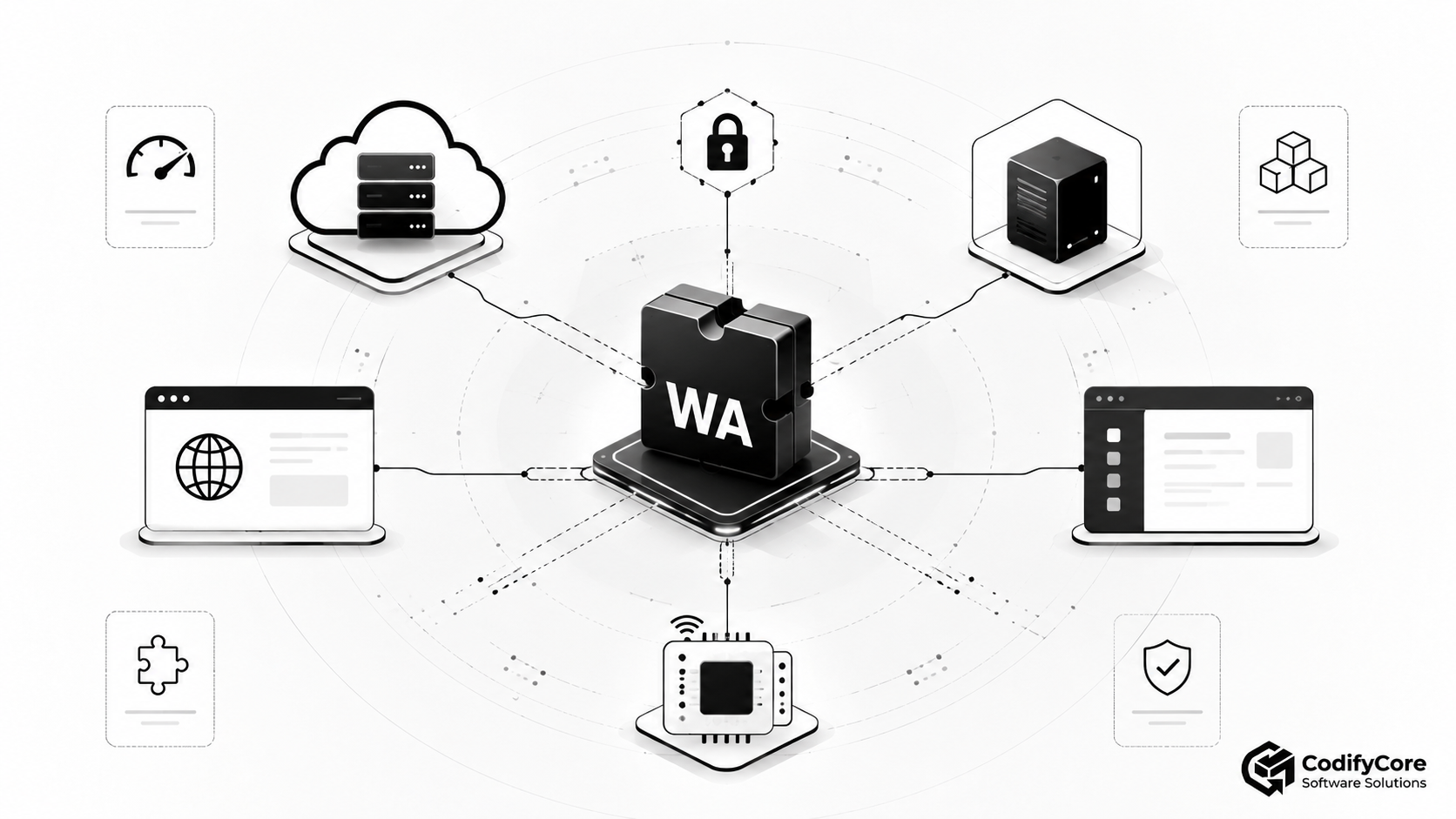
Quick answer: What does WebAssembly beyond the browser mean?
WebAssembly beyond the browser means running compiled .wasm binaries inside standalone runtimes and host applications rather than only inside a webpage.
The runtime can execute the component on:
- A cloud server
- An edge location
- A Kubernetes node
- A desktop application
- A plugin host
- An embedded device
- An Internet of Things gateway
- A serverless platform
- A developer tool
WebAssembly provides the portable instruction format.
WASI provides standard interfaces through which non-browser components can request capabilities such as files, clocks, randomness, sockets and HTTP.
The WebAssembly Component Model adds typed, language-neutral contracts that allow components and hosts to exchange higher-level values and compose independently developed functionality.
The practical result is:
Developers can compile bounded software capabilities once and run them through compatible hosts without packaging an entire operating-system environment with each capability.
Key takeaways
- WebAssembly is a portable binary instruction format, not a programming language or operating system.
- WebAssembly was designed to support non-web embeddings as well as browser execution. [1]
- A core Wasm module is not the same as a WebAssembly component. Components add typed interfaces, composition and higher-level interoperability.
- WIT—WebAssembly Interface Type—describes what a component imports and exports without defining its internal implementation.
- WASI gives non-browser WebAssembly programs access to selected system capabilities through standardised host interfaces.
- WASI applications begin without ambient authority and receive only the capabilities explicitly granted by the host. [4]
- WebAssembly’s sandbox reduces the authority of guest code, but it does not make applications or runtimes automatically invulnerable.
- WebAssembly aims for efficient, near-native execution, but actual performance depends on workload, runtime, compiler, host calls, memory use and interface crossings.
- Portability requires compatible interfaces. A component that depends on proprietary host APIs is not universally portable merely because it ends in
.wasm. - WebAssembly and containers are complementary. Wasm is often better for small, bounded capabilities; containers remain better for complete operating-system-oriented workloads.
- The Component Model is being standardised incrementally. WASI 0.2 is the current broadly documented Component Model release, while WASI 0.3 concurrency features should still be treated as preview or forthcoming and verified against each runtime. [3][4]
- Strong use cases include plugins, edge functions, multi-tenant extensions, policy engines, media processing, developer tools and embedded workloads.
- Stateful data should normally remain in host-managed services rather than inside disposable components.
- Production teams should validate the exact language toolchain, WASI release, runtime and interface versions they intend to support.
What is WebAssembly?
WebAssembly, usually shortened to Wasm, is a binary instruction format for a stack-based virtual machine.
Developers normally write code in a source language such as:
- Rust
- C
- C++
- Go or TinyGo
- C#
- JavaScript or TypeScript through component tooling
- Python through compatible toolchains
- Other languages with suitable Wasm support
The source code is compiled into WebAssembly bytecode.
A compatible runtime then validates and compiles or interprets that bytecode for the current processor.
The official WebAssembly project describes Wasm as a portable compilation target for programming languages and states that it is intended for both client and server applications. Its execution format is designed for efficient encoding, loading and use of common hardware capabilities. [1]
WebAssembly is not machine code
A .wasm binary does not normally contain x86-64 or ARM instructions ready to execute directly on the processor.
The runtime translates or compiles it into suitable native instructions.
This intermediate format is what allows the same Wasm binary to run on different processor and operating-system combinations where compatible runtimes exist.
WebAssembly is not JavaScript
Inside the browser, JavaScript can load and call Wasm modules.
Outside the browser, a standalone runtime such as Wasmtime can execute Wasm without a JavaScript engine.
A host written in Rust, C, C++, Go, Python, .NET or another supported language can also embed a runtime and invoke a Wasm module as part of its own application.
WebAssembly is not a complete operating system
Core WebAssembly does not automatically provide:
- Filesystem access
- Network access
- Environment variables
- Clocks
- Randomness
- Threads
- Processes
- Device access
- Database connections
Those abilities must be provided by the host through imports or standard interfaces such as WASI.
This absence is a security advantage, but it also means the runtime and application architecture must deliberately define what the guest can do.
What changed with WebAssembly 3.0?
WebAssembly 3.0 became the project’s new live core standard in September 2025.
The release expanded the core language with major capabilities developed over several years, including support for 64-bit memories and tables together with other improvements to types, execution and language implementation.
The core standard remains separate from WASI and the Component Model:
- Core Wasm defines the low-level execution format.
- The Component Model defines how higher-level components expose and consume typed interfaces.
- WASI defines portable system-facing interfaces for non-browser applications.
An application may therefore use Wasm 3.0 core features without being a WASI application or Component Model component. [2]
What does “beyond the browser” include?
Non-browser WebAssembly can appear in several forms.
Standalone command or service
A runtime executes a Wasm program similarly to a native command:
wasmtime application.wasm
The component may receive selected filesystem, environment, network or HTTP capabilities from the runtime.
Embedded runtime
An existing product embeds a Wasm engine.
For example, a content-management system, data platform or developer tool can load third-party Wasm plugins without executing unrestricted native libraries in its main process.
Serverless or edge runtime
A platform instantiates Wasm modules or components in response to:
- HTTP requests
- Messages
- Queue events
- Scheduled events
- Data-pipeline events
Cloudflare Workers, for example, supports loading Wasm modules and writing Workers in languages such as Rust through platform bindings. [6]
Cloud-native component platform
A runtime platform can orchestrate Wasm components across cloud, Kubernetes, datacentre and edge environments.
Projects such as Spin and wasmCloud use WebAssembly components as deployable units for functions, event-driven services and modular applications. [7][8]
Embedded or Internet of Things runtime
A lightweight runtime can execute bounded logic on devices or gateways with limited storage and memory.
WasmEdge and other runtimes target cloud, edge, embedded and host-application use cases. [9]
Plugin or extension host
A product exposes a defined interface and loads Wasm extensions supplied by:
- Customers
- Partners
- Internal development teams
- Marketplace publishers
- Automated code-generation systems
The host retains control over which capabilities the extension receives.
Core Wasm modules versus WebAssembly components
The distinction between a module and a component is essential.
| Area | Core WebAssembly module | WebAssembly component |
|---|---|---|
| Primary abstraction | Low-level executable module | Interface-defined software component |
| Function value types | Primarily core numeric and reference types | High-level types through WIT |
| Strings and records | Require ABI conventions or glue | Represented through component interfaces |
| Language interoperability | Possible but often manually adapted | Designed for generated language bindings |
| Imports and exports | Low-level module functions and resources | Typed interfaces and worlds |
| Composition | Manual linking or host integration | Components can satisfy one another’s imports |
| System access | Host-defined imports or legacy WASI | Commonly used with WASI 0.2 interfaces |
| Best use | Low-level execution and existing toolchains | Reusable, composable application capabilities |
The core-module problem
Suppose a Rust module exports this logical function:
analyse-document(document: string) -> report
Core WebAssembly does not natively define the application-level meaning of:
stringreport- Ownership of memory
- Allocation
- Error values
- Resource lifetimes
The host and guest must agree on an ABI and memory-handling convention.
That convention may be language- or toolchain-specific.
The component solution
The Component Model allows the interface to be expressed through WIT:
package codifycore:analysis;

interface document-analysis {
    record report {
        category: string,
        score: float32,
        warnings: list<string>,
    }

    analyse: func(document: string) -> result<report, string>;
}
Tooling can generate bindings for supported source and host languages.
The component is no longer simply a low-level function table. It carries a typed contract describing how it interacts with its environment.
What is WIT?
WIT stands for WebAssembly Interface Type.
It is an interface-description language used to define:
- Functions
- Parameters
- Return values
- Records
- Variants
- Lists
- Options
- Results
- Resources
- Interfaces
- Worlds
WIT defines a contract, not behaviour.
It describes what a component provides and what it requires.
Interface
An interface groups related types and functions.
For example:
interface image-resizer {
    resize: func(
        source: list<u8>,
        width: u32,
        height: u32
    ) -> result<list<u8>, string>;
}
World
A world describes the complete external surface of a component.
It identifies:
- Imported functions and interfaces
- Exported functions and interfaces
A component can run when its required imports are satisfied by the host or other components.
WIT packages can also be versioned and shared, allowing separately developed components to use common interface definitions. [3]
Why the Component Model matters
Portable machine instructions solve only part of software portability.
Applications also need portable ways to express:
- Data structures
- Errors
- Resources
- Dependencies
- Host services
- Versioned contracts
The Component Model provides that higher-level layer.
Language-neutral contracts
A component written in Rust can expose an interface consumed by a host or component written through another supported language toolchain.
Neither side needs to share the same source-language ABI.
Explicit dependencies
The component declares the interfaces it imports.
For example:
Imports:
- wasi:http/outgoing-handler
- company:logging/log
- company:customer-data/read

Exports:
- company:recommendation/generate
The host can decide which implementations satisfy those imports.
Composition
One component’s export can satisfy another component’s import.
This allows applications to be assembled from several isolated units rather than compiled into one monolithic binary.
Replaceable implementations
A component may depend on a generic key-value interface.
The host can connect that interface to:
- Redis
- A cloud key-value service
- An in-memory test store
- An embedded database
The business component does not need to know the vendor-specific implementation.
What is WASI?
WASI stands for WebAssembly System Interface.
It defines portable interfaces through which WebAssembly applications can request system and external capabilities.
WASI 0.2 includes interfaces covering areas such as:
- Clocks
- Randomness
- Filesystems
- Sockets
- Command-line applications
- HTTP
These interfaces are defined through WIT and used with the Component Model. [4]
Why WASI is necessary
A browser provides APIs for:
- Networking
- Storage
- User input
- Graphics
- Timers
A standalone runtime does not automatically have those browser APIs.
WASI creates standard interfaces that a host can implement consistently across supported environments.
Capability-based access
A WASI application starts without ambient authority.
It cannot automatically access:
- Every file
- Every environment variable
- Every network destination
- Every device
- Every host service
The host must grant access.
For example:
Allowed:
- Read /templates
- Write /output
- Send HTTPS requests to api.example.com

Denied:
- Read /home
- Read environment secrets
- Connect to arbitrary hosts
- Execute processes
This is a stronger default than loading a native library with the full authority of the host process.
What is the current WASI and Component Model maturity?
The ecosystem has both established and rapidly evolving parts.
WASI 0.1
WASI 0.1 remains widely supported in existing runtimes and production deployments.
It uses the earlier module-oriented model and lower-level interface definitions.
WASI 0.2
WASI 0.2 is the current documented Component Model release.
It introduced:
- WIT-defined WASI interfaces
- High-level component types
- Resource handles
- Component-oriented linking
- Language-neutral bindings
Its initial release was approved in January 2024, and subsequent patch releases have refined documentation and interfaces. [4]
WASI 0.3
WASI 0.3 focuses on native asynchronous and concurrent component capabilities, including concepts such as:
- Asynchronous functions
- Streams
- Futures
- Updated ABI mechanisms
There is an important maturity distinction as of June 2026:
- The Component Model repository describes 0.3 as a developer-preview milestone.
- The main WASI interface documentation still describes WASI 0.3 as forthcoming and its interfaces as draft.
Production teams should therefore treat 0.3 as preview functionality and confirm support in the exact runtime, SDK and language toolchain they intend to use. [3][4]
The Component Model itself
The Component Model remains under active standardisation through the W3C WebAssembly Community Group.
Stable subsets are used in real systems, but not every proposed feature has identical support across runtimes.
The correct production question is not:
Does this runtime support the Component Model?
It is:
Does this runtime support the exact Component Model and WASI features, interface versions and language bindings required by this application?
The WebAssembly application stack
A production WebAssembly application contains several distinct layers.
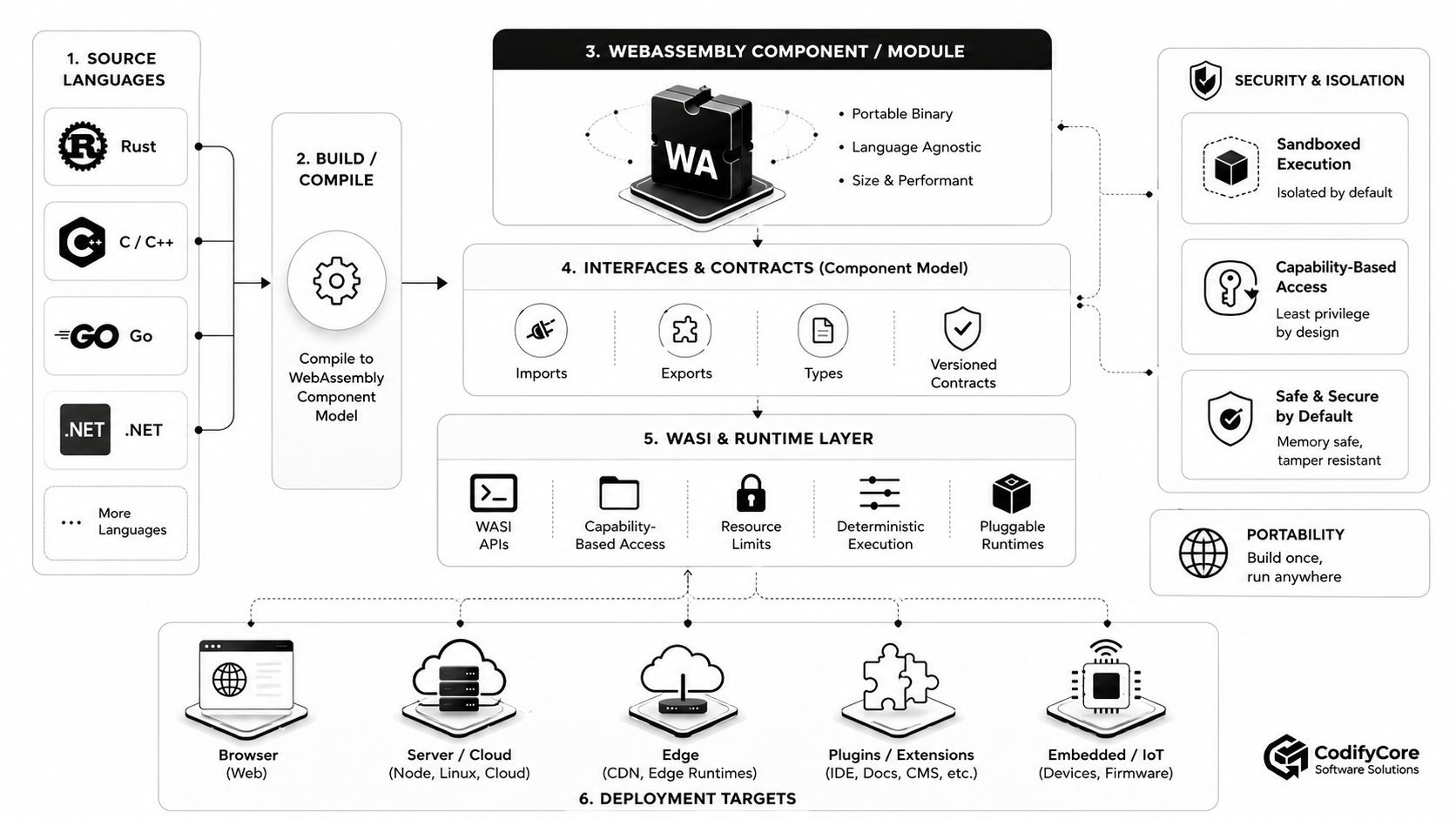
1. Source-language layer
Developers work in a supported source language.
The quality of the experience depends on:
- Compiler maturity
- Standard-library support
- Component bindings
- WASI support
- Debugging tools
- Package compatibility
Language support is not uniform.
Rust, C and JavaScript-oriented tooling are relatively mature in several ecosystems, while C++, Java, Kotlin, Swift and other toolchains may have partial, experimental or roadmap-level support depending on the target platform. [8]
2. Compilation layer
The compiler produces:
- A core Wasm module
- A WASI module
- A Component Model component
- An intermediate module that tooling later wraps as a component
The target must match the runtime.
Examples include:
wasm32-wasip1
wasm32-wasip2
core wasm module
Component Model binary
3. Component layer
The component contains:
- Executable modules
- Imports
- Exports
- Interface types
- Subcomponents or adapters where applicable
- Metadata and version relationships
4. Interface layer
WIT defines the contracts connecting:
- Component to host
- Component to component
- Guest language to generated bindings
- Host implementation to guest expectation
5. WASI or host-capability layer
The runtime implements the interfaces that permit the component to:
- Read approved files
- Make approved network requests
- Access clocks
- Generate randomness
- Handle HTTP requests
- Use platform-defined services
6. Runtime layer
The runtime:
- Validates the binary
- Compiles or interprets it
- Creates isolated memory
- Satisfies imports
- Enforces resource limits
- Connects host capabilities
- Reports traps and errors
Examples include:
- Wasmtime
- WasmEdge
- Browser engines
- Jco-supported JavaScript environments
- Platform-specific runtimes
- Embedded runtimes
7. Host application or platform
The host decides:
- Which component to load
- Which interfaces to provide
- Which resources to grant
- Which limits to enforce
- How state is stored
- How requests are routed
- How telemetry is collected
8. Deployment environment
The same logical component may run in:
- Developer workstation
- CI pipeline
- Server
- Cloud
- Edge node
- Plugin host
- Embedded device
Portability exists only when each environment supplies compatible interfaces and behaviour.
The WebAssembly security model
WebAssembly’s security advantage comes from restricted authority and isolation—not from assuming the guest code is trustworthy.
Isolated linear memory
A module accesses its own linear memory.
Memory accesses are bounds-checked by the runtime.
The guest cannot directly use arbitrary host-process memory addresses.
Restricted control flow
The Wasm execution model validates functions and instructions before execution.
The guest cannot freely jump to arbitrary machine-code addresses.
Explicit imports
External functionality must be imported.
A module cannot directly call an operating-system function simply because that function exists on the host.
Host-defined capabilities
The runtime or host decides which imports are satisfied.
A component can be given access to one directory or one HTTP domain rather than the entire host environment.
The official WebAssembly security model describes each module as running in a sandbox and states that access to the outside environment must occur through appropriate APIs. [5]
Sandboxed does not mean invulnerable
A production team should avoid claims such as:
WebAssembly is completely secure.
Several risk areas remain.
Runtime vulnerabilities
A defect in the runtime, compiler or sandbox implementation can potentially allow incorrect behaviour or escape.
Wasmtime published security advisories in April 2026 and described additional work involving fuzzing, formal verification and vulnerability discovery. This is evidence of an actively maintained security process—but also a reminder that the runtime remains security-critical software. [5]
Host-interface vulnerabilities
A safe sandbox can expose an unsafe host function.
For example:
delete-file(path: string)
is dangerous when the host:
- Fails to validate the path
- Follows symbolic links unexpectedly
- Does not check tenant ownership
- Gives the component excessive directory access
The host boundary must be designed as carefully as an external API.
Resource exhaustion
A component may consume:
- CPU
- Memory
- Open handles
- Network bandwidth
- Storage
- Host calls
The runtime should enforce:
- Memory limits
- Execution deadlines
- Fuel or instruction budgets
- Request quotas
- Concurrent-instance limits
- Output-size limits
Application-level vulnerabilities
Code compiled from C or C++ can still contain:
- Buffer logic errors
- Use-after-free behaviour within its own memory model
- Incorrect validation
- Injection vulnerabilities
- Authentication flaws
- Business-logic defects
The Wasm sandbox limits the blast radius. It does not make the application logic correct.
Supply-chain risk
A signed Wasm component can still contain malicious behaviour.
Signing proves the origin and integrity of the artifact, not that its behaviour is safe.
Components still require:
- Dependency review
- Vulnerability scanning
- Provenance
- Security testing
- Controlled publishing
- Runtime policy
Capability-based security in practice
Consider a customer-supplied reporting plugin.
A native plugin loaded into the main process may inherit access to:
- Application memory
- Environment secrets
- Files
- Network
- Database credentials
- Native operating-system APIs
A WebAssembly plugin can instead receive three interfaces:
Imports:
- reporting:read-approved-data
- reporting:write-report
- logging:record-event
The plugin does not receive:
- General SQL access
- Arbitrary filesystem access
- Arbitrary network access
- Process execution
- Application secrets
The host mediates every external effect.
This is the security model’s most practical value.
Is WebAssembly really high performance?
WebAssembly is designed for efficient decoding, validation and execution.
The official project states that Wasm aims to execute at native speed by using hardware capabilities available across platforms. [1]
“Aims to execute at native speed” should not be interpreted as:
Every WebAssembly program is as fast as an optimised native binary.
Actual performance depends on several factors.
Compute-intensive code
Wasm can perform well for:
- Parsing
- Compression
- Cryptography
- Image processing
- Audio processing
- Numerical algorithms
- Rule evaluation
- Data transformation
These workloads perform substantial computation for each host interaction.
Host-call overhead
Performance can decrease when a component repeatedly crosses the guest-host boundary.
Examples include:
- Calling one host function for every row
- Copying many small strings
- Repeatedly serialising complex structures
- Making many tiny network requests
- Excessive component-to-component calls
Interfaces should be designed around useful work units rather than extremely fine-grained calls.
Memory copying
Moving data between:
- Host memory
- Guest linear memory
- Different components
- Serialised external formats
can become more expensive than the underlying computation.
Compiler and runtime quality
Performance varies across:
- Source-language compiler
- Optimisation level
- Wasm runtime
- JIT versus ahead-of-time compilation
- Processor architecture
- Garbage-collection strategy
- SIMD support
- Runtime configuration
I/O-bound workloads
A program spending most of its time waiting for a database or network service may gain little from faster instruction execution.
The benefit may instead come from isolation, portability or startup characteristics.
Startup
Compact Wasm binaries and runtime caching can allow fast instantiation.
This is valuable for:
- Serverless functions
- Per-request isolation
- On-demand plugins
- Edge workloads
- Short-lived tasks
Cold-start behaviour should still be benchmarked with the intended runtime, component size, compiler and host interfaces.
WebAssembly versus containers
WebAssembly is often described as a container replacement.
That is too broad.
| Area | WebAssembly component | Linux container |
|---|---|---|
| Packaging unit | Application component or bounded program | Application plus user-space dependencies |
| Operating-system dependency | Host interfaces and runtime | Usually Linux kernel and container runtime |
| Default authority | No ambient access in WASI capability model | Depends on container configuration |
| Isolation | Runtime sandbox | Kernel namespaces, capabilities and controls |
| Startup | Often lightweight | Usually heavier, but highly optimised |
| Artifact size | Often smaller | Frequently larger |
| POSIX compatibility | Limited and evolving | Strong |
| Existing software compatibility | Requires Wasm-capable build | Runs many existing Linux applications |
| System access | Explicit host capabilities | Broad OS interface inside container |
| Best fit | Plugins, functions and bounded logic | Full services and existing application stacks |
When WebAssembly is stronger
Wasm can be preferable when:
- Untrusted or third-party logic must run safely
- Thousands of isolated instances may be needed
- Startup latency matters
- The same logic must run across several environments
- Each workload needs only a narrow capability set
- Artifact size matters
- The host needs to embed extensions directly
When containers are stronger
Containers are preferable when:
- The application depends heavily on Linux or POSIX
- Existing binaries cannot be recompiled
- The service runs several processes
- Native drivers or system utilities are required
- Mature container observability and debugging are priorities
- The team relies on the broader container ecosystem
- The workload needs unrestricted or complex operating-system interaction
Current integration reality
Docker Engine can use Wasmtime through an alternative containerd runtime, but its documented Wasmtime integration remains experimental.
Docker Desktop’s earlier dedicated Wasm-workload feature is deprecated and no longer actively maintained.
This illustrates the wider reality: Wasm integration with established container tooling exists, but maturity and product commitment vary by platform. [10]
WebAssembly versus serverless functions
Serverless is a deployment and billing model.
WebAssembly is an execution format.
A serverless platform may use:
- Containers
- Processes
- MicroVMs
- JavaScript isolates
- WebAssembly
- A combination
Wasm can improve a serverless platform through:
- Compact deployment units
- Rapid instantiation
- Multi-language compilation
- Strong guest isolation
- Host-controlled interfaces
The serverless platform still provides:
- Routing
- Scaling
- State services
- Networking
- Identity
- Logs
- Billing
- Deployment
- Operational controls
Where WebAssembly beyond the browser adds value
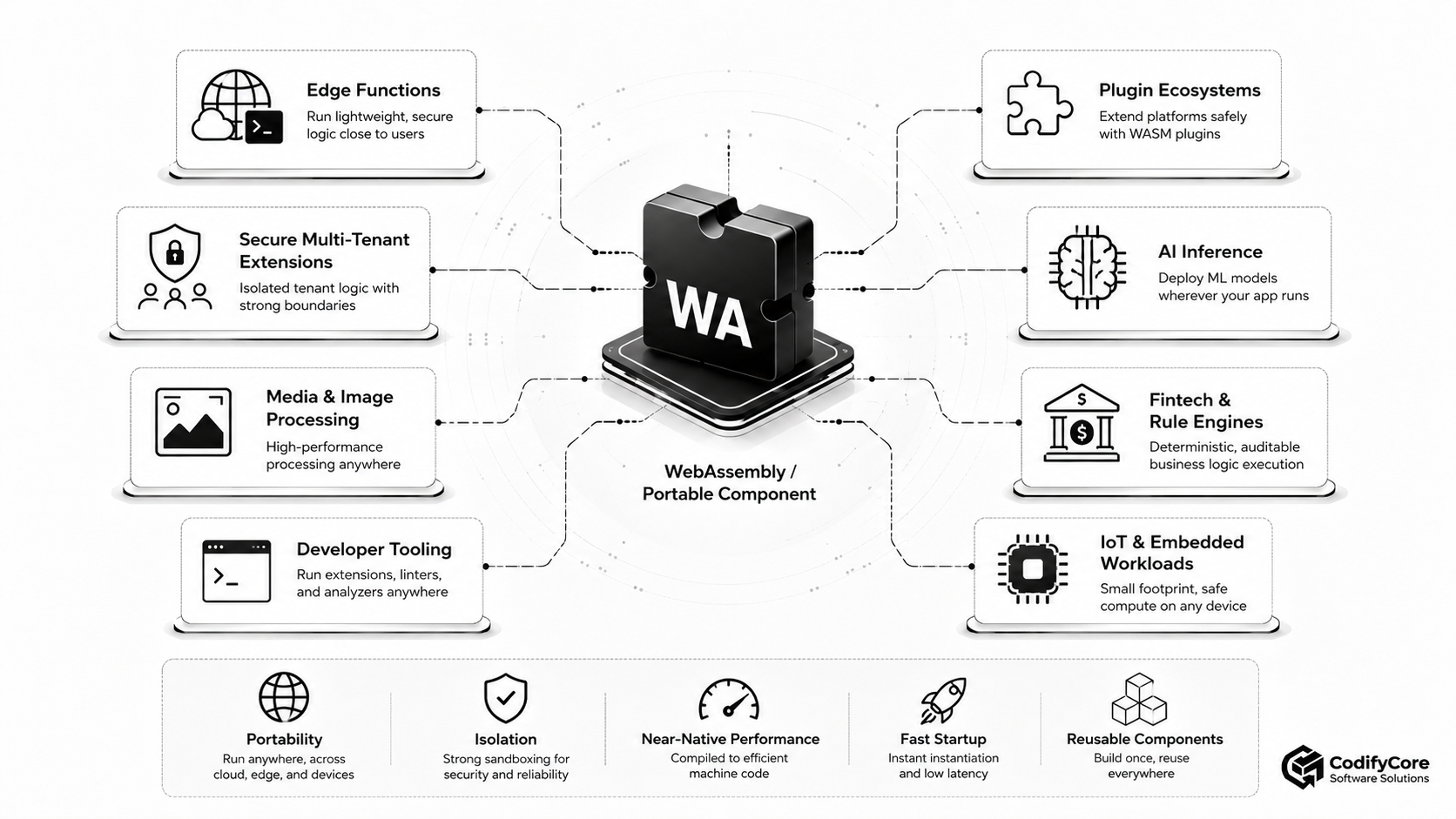
1. Edge functions
Edge locations benefit from workloads that:
- Start quickly
- Use little memory
- Can be replicated globally
- Remain isolated from other tenants
- Run on different processor architectures
Wasm can handle:
- Request transformation
- Authentication logic
- Content personalisation
- Feature evaluation
- Image processing
- Data validation
Cloudflare Workers is one current example of a global platform that supports WebAssembly modules. [6]
2. Plugin ecosystems
Products can expose safe extension points for:
- Custom validation
- Import and export transforms
- Workflow steps
- Content processing
- Reporting
- Business rules
- Developer tooling
A Wasm plugin receives only the interfaces granted by the host.
This can provide a safer alternative to loading an arbitrary native dynamic library.
3. Secure multi-tenant extensions
A SaaS platform may allow each customer to upload custom logic.
Examples include:
- Pricing formulas
- Eligibility rules
- Data transformations
- Notification logic
- Document validation
- Routing rules
Each tenant’s component can run with:
- Separate memory
- Execution limits
- Tenant-scoped data interfaces
- No arbitrary network access
- No host credentials
4. Policy and rule engines
Deterministic business logic can be compiled and deployed as a versioned component.
Examples include:
- Tax calculations
- Pricing rules
- Product eligibility
- Compliance validation
- Feature policies
- Financial calculations
- Workflow conditions
The host records:
- Component version
- Input
- Output
- Policy version
- Execution result
5. Media and document processing
Wasm is well suited to computational libraries for:
- Image resizing
- Compression
- Document conversion
- PDF processing
- Audio transformation
- Video-related utility functions
- Format parsing
The same processing component may run:
- In a browser
- On a server
- At the edge
- Inside a desktop application
6. Developer tooling
Editors and development platforms can load portable:
- Linters
- Formatters
- Parsers
- Compilers
- Code analysers
- Documentation generators
- Test utilities
The tool can execute locally or remotely through the same interface without receiving unrestricted access to the developer’s machine.
7. AI inference and data preprocessing
Selected machine-learning workloads may use Wasm for:
- Lightweight inference
- Tokenisation
- Feature extraction
- Data preprocessing
- Post-processing
- Model-adjacent business rules
Wasm is not automatically the best runtime for large GPU-dependent models.
Its strongest role is often portable CPU execution around the model or for relatively compact models.
8. Embedded and IoT applications
A device can run portable logic for:
- Sensor filtering
- Event processing
- Local rules
- Protocol translation
- Updateable device behaviour
- Offline validation
The host firmware retains control over:
- Hardware interfaces
- Network access
- Storage
- Component updates
- Execution limits
9. Database and data-platform functions
A platform can allow users to install:
- User-defined functions
- Transformations
- Validation logic
- Event processors
- Query-adjacent computations
The Wasm sandbox limits direct access to the database host.
10. Agent and automation tools
An AI-agent platform may execute generated or third-party tools as Wasm components.
The agent receives a bounded interface such as:
calculate-price
convert-document
validate-policy
analyse-image
The generated code does not receive general shell, filesystem or credential access.
Stateful applications and WebAssembly
WebAssembly components are frequently most effective when treated as stateless or short-lived compute units.
That does not mean they cannot participate in stateful applications.
It means durable state should normally be owned by external services.
Host-managed state
The host can provide interfaces for:
- Key-value storage
- Relational data
- Object storage
- Queues
- Messaging
- Secrets
- Configuration
- Caching
The component calls the interface without depending directly on one vendor implementation.
Benefits
This separation provides:
- Easier scaling
- Replaceable storage providers
- Cleaner capability boundaries
- Disposable component instances
- Simpler recovery
- More consistent deployment across environments
Limitation
A component that imports one platform’s proprietary database interface may not run on another platform without an adapter.
Portability depends on the contract, not only the executable format.
Portability is conditional
The phrase “compile once, run anywhere” requires qualification.
A component can run anywhere that provides:
- A compatible WebAssembly core implementation
- The required Component Model features
- The required WASI release
- Every imported WIT interface
- Compatible resource behaviour
- Sufficient CPU and memory
- Any required architecture-specific features
A more accurate statement is:
Compile once for a declared component world, then run on hosts that implement that world compatibly.
Sources of portability failure
- Runtime lacks the required WASI version
- Language toolchain uses unsupported features
- Component depends on a proprietary interface
- Host implements different interface versions
- File or socket semantics differ
- Component assumes unavailable threads
- Runtime lacks required SIMD or memory features
- Embedded target has insufficient resources
Build a compatibility matrix
For each supported target, record:
| Target | Runtime | Core Wasm | Component Model | WASI | Custom interfaces |
|---|---|---|---|---|---|
| Developer machine | Wasmtime | 3.0 | Required subset | 0.2 | Company interfaces v1 |
| Edge platform | Platform runtime | Supported subset | Platform-dependent | Platform-dependent | Limited |
| Plugin host | Embedded runtime | Required subset | 0.2 | Custom subset | Product plugin API |
| IoT device | Lightweight runtime | Limited subset | Verify | Limited | Device APIs |
Do not declare a component portable until it has passed a shared conformance and integration test suite on every supported host.
Language support is uneven
WebAssembly is language-neutral at the binary level.
Development experience is not equally mature for every language.
A toolchain must provide:
- Wasm compiler target
- Standard-library adaptation
- WIT binding generation
- Component creation
- WASI integration
- Debugging
- Packaging
Current component platforms commonly provide practical support for languages such as Rust, JavaScript or TypeScript, Go through TinyGo, C, C#, Python and selected others.
Other languages may have experimental, planned or incomplete support.
Even within a supported language, a package may depend on:
- Native system libraries
- Dynamic loading
- Threads
- Processes
- Unsupported sockets
- Platform-specific code
and therefore fail to compile for the desired Wasm target. [8]
Build once, deploy many: a practical delivery pipeline
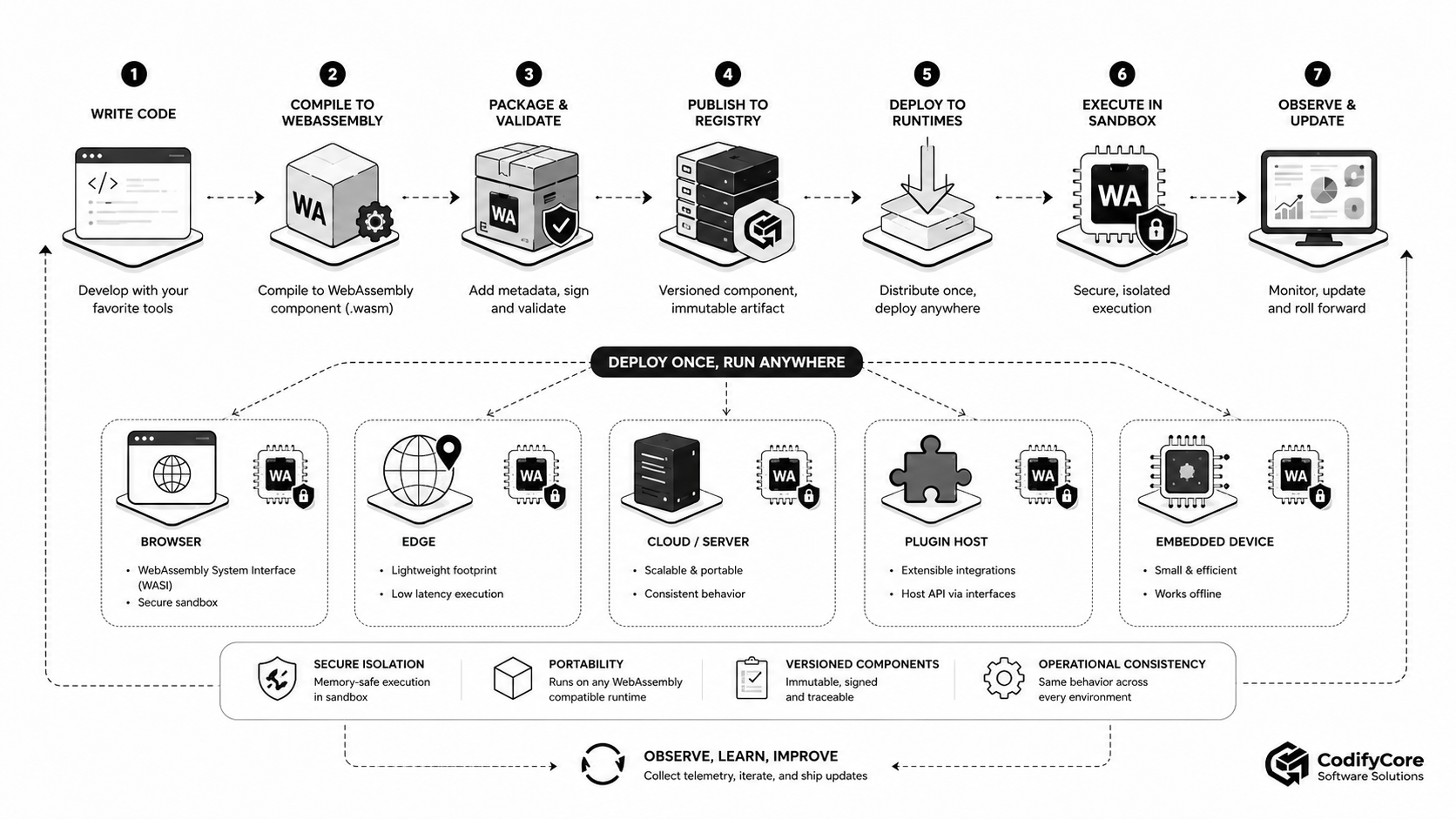
Step 1: Define the capability
Start with a bounded responsibility.
Good examples:
- Validate one document type
- Calculate one price
- Resize one image
- Apply one policy
- Transform one event
- Process one request
Avoid beginning with a complete monolithic enterprise platform.
Step 2: Define the WIT contract
Specify:
- Inputs
- Outputs
- Errors
- Resources
- Imported host capabilities
- Exported functions
- Version
Review the interface as an API.
Step 3: Select target environments
Identify:
- Browser
- Server
- Cloud
- Edge
- Plugin host
- Embedded device
The target environments determine the required runtime and WASI profile.
Step 4: Select the toolchain
Confirm:
- Source-language support
- Compiler target
- Component tooling
- Bindings generation
- Package compatibility
- Debugging
- CI compatibility
Step 5: Compile the component
Produce the component binary and retain:
- Compiler version
- Toolchain version
- Source revision
- WIT package versions
- Build flags
- Dependency lockfile
Step 6: Validate the component
Check:
- Binary validity
- Required imports
- Expected exports
- Interface compatibility
- Resource limits
- Prohibited imports
- Size constraints
Step 7: Test in multiple runtimes
Where portability matters, test against more than one conformant runtime or host.
This can expose hidden dependencies on one implementation.
Step 8: Generate provenance and inventory
Record:
- Source repository
- Commit
- Builder
- Dependencies
- Licences
- WIT contracts
- Component digest
- Security scan
- Test results
Step 9: Sign and publish
Publish the immutable artifact to an approved registry or package system.
Platforms such as wasmCloud support publishing components through OCI-compatible registries. [8]
Step 10: Define runtime policy
Specify:
- Allowed files
- Allowed network destinations
- Permitted host interfaces
- Memory limit
- CPU or execution budget
- Timeout
- Concurrency
- Logging policy
- Tenant scope
Step 11: Deploy
Deploy the same component to compatible environments without rebuilding unless the target requires a different feature set.
Step 12: Observe
Collect:
- Invocation count
- Duration
- Traps
- Memory use
- Host-call duration
- Interface errors
- Timeouts
- Version
- Tenant
- Runtime
- Target environment
Step 13: Roll forward or back
Component artifacts should be:
- Immutable
- Versioned
- Addressable by digest
- Reproducible
- Reversible
Designing good component interfaces
A poor interface can remove most of WebAssembly’s architectural benefits.
Prefer coarse-grained functions
Better:
analyse-invoice(invoice) -> assessment
Worse:
read-byte
read-next-byte
parse-character
set-field
The first reduces interface crossing and keeps implementation detail inside the component.
Use explicit data types
Prefer structured WIT records and variants over opaque JSON strings when interoperability and validation matter.
Keep interfaces narrow
A component should not import a generic interface named:
system:do-anything
It should import specific capabilities:
customer-data:read-summary
notification:draft
audit:write-event
Model failure
Define:
- Expected business errors
- Transient host failures
- Invalid input
- Permission denial
- Resource exhaustion
- Unsupported version
Do not convert every failure into a generic trap.
Version carefully
Avoid breaking existing consumers unnecessarily.
Use:
- Versioned WIT packages
- Compatibility tests
- Deprecation
- Migration periods
- Adapters where appropriate
Component composition
Composition allows several independently built components to form one larger component or application.
Example:
HTTP handler
    ↓
Authentication component
    ↓
Business-rules component
    ↓
Data-transformation component
    ↓
Host storage interface
Each component can:
- Use a different implementation language
- Have its own release cycle
- Export a typed contract
- Receive only the capabilities it needs
Benefits
- Smaller trust boundaries
- Replaceable implementations
- Language choice by component
- Independent testing
- Reuse
- Policy enforcement at boundaries
Costs
- More interfaces
- More version management
- Possible data-copying overhead
- More complex debugging
- Dependency graphs
- Tooling maturity requirements
Do not split an application into dozens of components merely because composition is possible.
Create a component boundary where it improves:
- Security
- Reuse
- Ownership
- Deployment
- Replaceability
- Language interoperability
Observability
A sandboxed component is still production software.
It needs telemetry.
Useful signals include:
Invocation metrics
- Calls
- Successes
- Failures
- Duration
- Queue time
- Cold starts
- Timeouts
Runtime metrics
- Memory
- Fuel consumption
- Compilation time
- Instantiation time
- Cache hits
- Traps
- Host-call count
Interface metrics
- Import called
- Version used
- Permission denied
- Host error
- Bytes transferred
- External dependency latency
Business metrics
- Documents processed
- Rules matched
- Images transformed
- Transactions evaluated
- Invalid inputs
- Policy decisions
WASI’s 0.2 development line includes early work around standardised OpenTelemetry-related interfaces, but teams should verify maturity before depending on those interfaces as a portable production standard. [4]
Correlation
Propagate identifiers such as:
request_id
tenant_id
component_id
component_version
runtime_id
host_id
deployment_id
trace_id
Do not place secrets or unnecessary customer information in component logs.
Supply-chain security
Portable components can be distributed widely.
That increases the importance of artifact governance.
Approve publishers
Know:
- Who built the component
- Who owns it
- Which repository produced it
- Which signing identity is accepted
Pin immutable versions
Avoid resolving a floating tag such as:
plugin:latest
for production execution.
Prefer:
- Version
- Digest
- Verified signature
- Approved provenance
Scan dependencies
The component may contain code from:
- Cargo
- npm
- PyPI
- NuGet
- C or C++ packages
- Generated bindings
The sandbox reduces host authority but does not eliminate malicious or vulnerable dependencies.
Restrict imports
A component requiring unexpected capabilities should fail policy review.
For example:
Expected:
- read invoice
- write assessment

Unexpected:
- outbound internet
- read all files
- access environment secrets
Revoke components
The host should support:
- Denylisting a digest
- Disabling a publisher
- Removing a version
- Rolling back
- Isolating affected tenants
Common WebAssembly mistakes
1. Assuming .wasm means portable
Portability depends on imports, WASI, feature support and host behaviour.
2. Assuming sandboxed means trusted
Malicious logic can still misuse the capabilities it has been granted.
3. Granting broad filesystem or network access
This recreates ambient authority inside a nominally capability-based system.
4. Using WebAssembly for every microservice
Many services are already well served by conventional languages and containers.
5. Ignoring interface-call costs
Very small cross-boundary operations can damage performance.
6. Storing durable state inside instances
Instances may be restarted, replaced or scaled independently.
7. Depending on preview features without a compatibility plan
Component Model and WASI capabilities continue to evolve.
8. Promising universal language support
Compiler and library compatibility varies substantially.
9. Replacing application-level authorisation with sandboxing
The host must still verify:
- User
- Tenant
- Resource
- Action
- Purpose
10. Shipping without observability
A small binary can still fail, hang, consume resources or return incorrect results.
When WebAssembly is a strong architectural fit
Consider WebAssembly when several of these conditions apply:
- Code must run in several environments
- Third-party extensions must be isolated
- Startup speed matters
- Workloads are short-lived
- Many tenant-specific instances are required
- The application needs multi-language components
- Host capabilities should be deny-by-default
- Artifact size matters
- Edge or embedded execution is required
- Business logic should be portable across products
- Components must be replaceable behind stable contracts
When WebAssembly may be the wrong choice
Use another architecture when:
- The application depends heavily on POSIX
- Native libraries cannot be ported
- The process requires unrestricted operating-system access
- The team needs mature native debugging and profiling
- The workload is a large stateful server with no portability requirement
- The runtime lacks required networking or concurrency features
- GPU support is central
- Existing container deployment already solves the problem effectively
- The team cannot support evolving toolchains
- Cross-interface overhead exceeds the portability benefit
A compact decision framework
Use WebAssembly when this statement is true:
We need to run a bounded capability across several hosts with explicit permissions, lightweight isolation and a stable interface.
Prefer containers or native deployment when this statement is true:
We need to run a complete existing application that expects a conventional operating-system environment and broad system compatibility.
Use an ordinary in-process library when:
The code is trusted, used by one application, shares one language and does not need an isolation boundary.
Use a remote service when:
The capability requires independent scaling, strong operational separation or centralised state and should not execute inside the consuming application.
What should organisations do now?
A practical preparation path is:
- Select one bounded, compute-oriented use case.
- Confirm that its dependencies compile to Wasm.
- Define its imports and exports in WIT.
- Target WASI 0.2 unless a newer capability is demonstrably required.
- Select two compatible runtimes for portability testing.
- Grant the minimum host capabilities.
- Benchmark native, container and Wasm versions.
- Add resource limits and observability.
- Sign and version the artifact.
- Pilot it in one real application.
- Document runtime and interface compatibility.
- Expand only after the operational benefit is measurable.
The future of WebAssembly components
The long-term importance of WebAssembly may be less about running entire applications in a new format and more about defining a universal unit for portable software capability.
A future enterprise platform may consume components for:
- Validation
- Policy evaluation
- Data transformation
- AI tools
- Content processing
- Integration adapters
- Customer extensions
- Device logic
Each component can declare:
- What it provides
- What it requires
- Which version it implements
- Which capabilities it needs
The host can decide:
- Whether to trust it
- Which resources to grant
- Where to run it
- Which implementation satisfies its dependencies
- When to replace it
This creates a model of software composition in which language and deployment environment are less tightly coupled.
The standards and tooling are not yet equally mature across every feature or language.
WASI 0.2 and production Component Model platforms demonstrate that the model is already useful, while the ongoing WASI 0.3 and Component Model work shows that concurrency and broader application requirements are still evolving. [3][4][7][8]
Conclusion
WebAssembly is no longer only a browser optimisation technology.
It is becoming a portable execution and component layer for software that must operate across:
- Cloud
- Edge
- Servers
- Applications
- Plugin hosts
- Developer tools
- Embedded devices
Core WebAssembly provides the portable instruction format.
The Component Model provides typed interfaces and composition.
WIT defines contracts.
WASI provides controlled access to external capabilities.
The host provides policy, state, integration and operations.
Together, these layers make it possible to package bounded capabilities as compact, sandboxed and reusable components.
The opportunity is not to rebuild every application in WebAssembly.
It is to identify the parts of an application that benefit from:
- Portability
- Isolation
- Fast instantiation
- Multi-language interoperability
- Explicit capability boundaries
- Safe extensibility
The right question is therefore not:
Can this application compile to WebAssembly?
It is:
Which software capabilities should become portable, interface-defined components, and what authority should each component receive wherever it runs?
That is where WebAssembly beyond the browser creates practical architectural value.
Frequently Asked Questions
What is WebAssembly?
WebAssembly is a portable binary instruction format designed as a compilation target for programming languages.
Can WebAssembly run without a browser?
Yes. Standalone runtimes and embedded engines can execute WebAssembly on servers, cloud platforms, edge nodes, applications and devices.
What is WASI?
WASI is a set of standard interfaces that allow non-browser WebAssembly programs to use selected capabilities such as files, clocks, randomness, sockets and HTTP.
What is the WebAssembly Component Model?
The Component Model defines how WebAssembly components expose typed interfaces, import dependencies and compose with hosts or other components.
What is WIT?
WIT is the interface-description language used to define the types, functions, imports and exports of WebAssembly components.
What is the difference between a module and a component?
A module is a low-level executable unit. A component wraps modules with higher-level typed interfaces and composition rules.
Is WebAssembly a programming language?
No. Developers normally write in another language and compile it to WebAssembly.
Is WebAssembly as fast as native code?
It can approach native performance for suitable workloads, but performance depends on the compiler, runtime, workload and host interactions.
Is WebAssembly secure?
WebAssembly provides a sandboxed execution model, but security still depends on the runtime, host interfaces, granted capabilities and application code.
Can WebAssembly access the filesystem?
Only when the host explicitly provides an appropriate filesystem capability.
Can WebAssembly access the internet?
Only when the runtime or host provides and permits a networking or HTTP interface.
Does WebAssembly replace containers?
No. WebAssembly is often suitable for bounded portable components, while containers remain stronger for complete operating-system-oriented applications.
Can WebAssembly run in Kubernetes?
Yes, through compatible runtimes, platforms and containerd integrations, although support and maturity vary.
Which languages support WebAssembly components?
Practical support exists for several languages, including Rust, C, JavaScript or TypeScript, Go through TinyGo, C#, Python and others. Toolchain maturity varies.
What is WASI 0.2?
WASI 0.2 is the current documented WASI release built around WIT and the WebAssembly Component Model.
What is WASI 0.3?
WASI 0.3 is the next development stage, focused on asynchronous and concurrent component capabilities. Its features should currently be treated as preview or draft unless verified in a specific runtime.
What are good non-browser WebAssembly use cases?
Good use cases include plugins, edge functions, policy engines, media processing, tenant-specific logic, developer tools and embedded workloads.
Can WebAssembly components share data?
Yes, through declared interfaces and host-managed services. Durable application state should normally remain outside disposable component instances.
Does WebAssembly support microservices?
It can support functions and component-oriented services, but it does not replace the networking, state, workflow and operational layers required by a microservice platform.
How should a team begin using WebAssembly?
Start with one bounded capability, define its WIT contract, target a stable WASI version, restrict its permissions and benchmark it against the existing implementation.