
Passwords have survived for decades because they are universally understood.
Users know where to type them. Developers know how to verify them. Support teams know how to reset them. Almost every application, browser, device and identity provider knows how to handle them.
The problem is that this familiarity hides substantial cost and risk.
Passwords can be:
- Forgotten
- Reused across services
- Guessed
- Phished
- Leaked from databases
- Captured by malware
- Shared insecurely
- Reset through social engineering
Adding one-time codes improves some password-based systems, but it also introduces more screens, message-delivery delays, support problems and phishing opportunities.
Passkeys offer a stronger alternative.
Instead of sending a shared secret to a server, a user’s device creates a public-private key pair. The private key remains under the control of the user’s authenticator or credential provider. The application stores the public key and later verifies a cryptographic response to a fresh challenge.
The user normally completes the interaction using the same mechanism used to unlock the device:
- Fingerprint
- Face recognition
- Device PIN
- Screen-lock pattern
- Security key PIN or touch
This can make authentication both safer and easier.
But implementing WebAuthn successfully is not the same as delivering a successful passkey product.
A production deployment must also solve:
- When users should be invited to create a passkey
- How sign-in options should be presented
- What happens on a new or shared device
- How native applications and websites share credentials
- How lost-device recovery works
- How passkeys are added, renamed and removed
- How high-assurance users are handled
- How passwords are gradually retired
- How support teams diagnose failed authentication
- How the organisation measures adoption and business impact
The main challenge is therefore not creating a public-key credential.
It is replacing the password journey without replacing familiar friction with unfamiliar confusion.
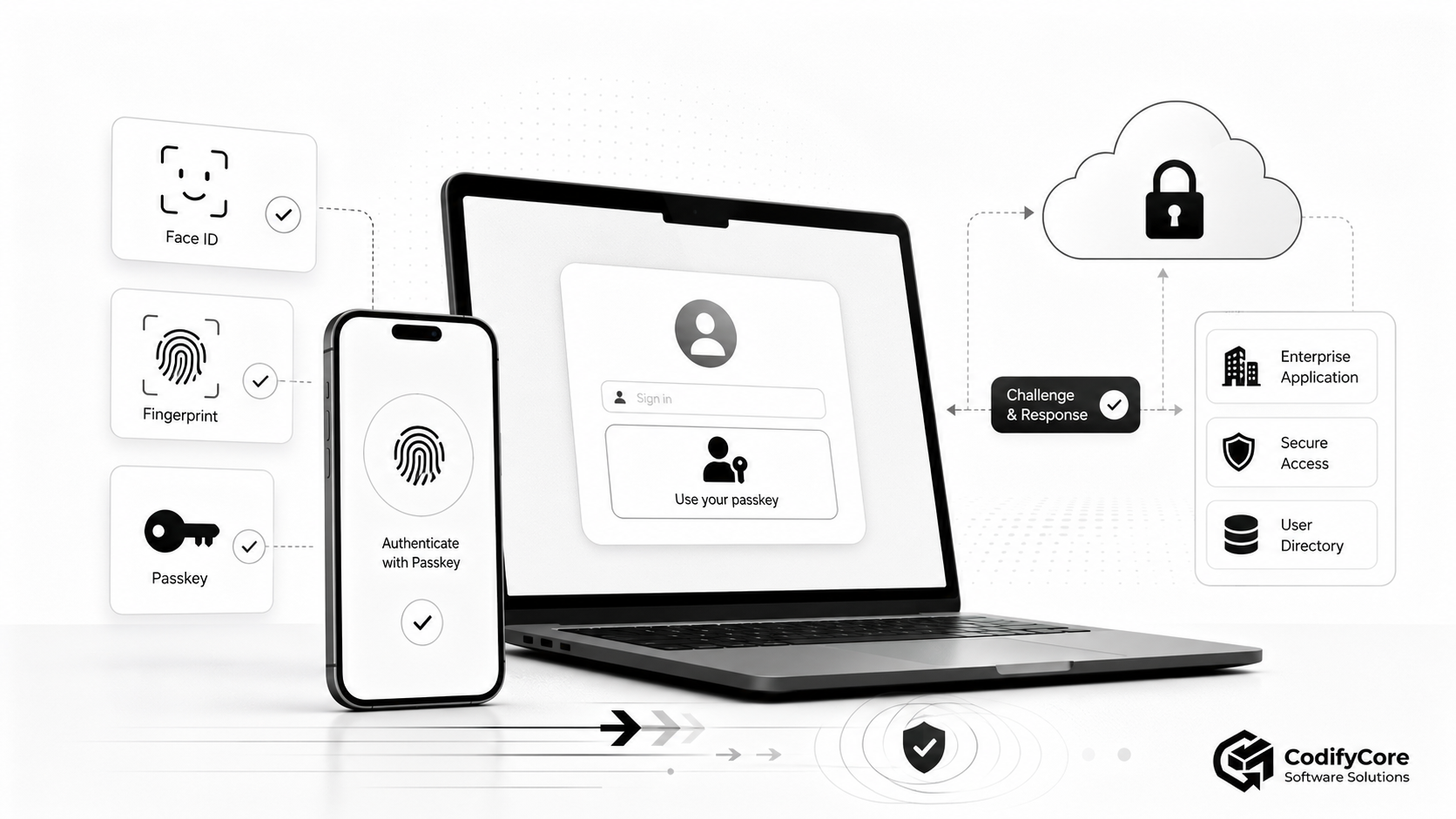
Quick answer: How should passkeys be deployed in production?
A production passkey rollout should introduce passkeys as the easiest sign-in option before attempting to remove every password.
The recommended approach is:
- Implement standards-based WebAuthn registration and authentication.
- Let existing users create a passkey after a successful trusted sign-in.
- Offer passkeys prominently through account selection or sign-in autofill.
- Keep an understandable alternative while adoption and device coverage grow.
- Support both synced passkeys and device-bound security keys according to risk.
- Provide a passkey-management page where users can add and remove credentials.
- Encourage users to register more than one means of account access.
- Design recovery before making passkeys mandatory.
- Protect passkey enrollment, removal and recovery as high-risk account events.
- Test browsers, operating systems, credential providers and cross-device flows.
- Measure enrollment, successful use, abandonment, recovery and support outcomes.
- Retire passwords only after the passkey and recovery journeys are proven.
The core product principle is:
Make the passkey path easier than the password path, but never make account access depend on a flow the user cannot understand or recover from.
Key takeaways
- A passkey is a FIDO credential based on a public-private key pair and scoped to a particular website or application. [1]
- The application stores a public key rather than a reusable password secret.
- The user’s fingerprint or face is normally used locally to unlock the authenticator; biometric data is not sent to the relying party. [1]
- Passkeys are phishing-resistant because the credential is cryptographically bound to the legitimate relying-party domain. [2]
- Synced passkeys improve convenience and recovery across devices, while device-bound passkeys can provide stronger control for high-assurance environments. [3]
- A synced passkey can support NIST AAL2 when the relevant requirements are satisfied, but its exportable nature does not meet the non-exportable-key requirement for AAL3. [4]
- Passkeys do not eliminate the need for secure sessions, authorisation, fraud controls or account recovery.
- The recovery journey can become the weakest part of an otherwise phishing-resistant system.
- Users should be able to create several passkeys and understand how to remove one associated with a lost or shared device.
- Autofill and account-selection experiences can let users choose a passkey without first typing a username. [5]
- Native applications require correctly configured domain association so that the app and website can use the intended relying-party identity.
- Passkey enrollment should be promoted at high-confidence moments, such as after successful sign-in or account creation—not through repeated disruptive prompts.
- Authentication telemetry should distinguish creation, cancellation, unavailable credentials, cross-device use, fallback and recovery.
- Password retirement should be phased. Removing passwords too early can turn a security improvement into an account-access problem.
What is a passkey?
A passkey is a passwordless FIDO authentication credential used to sign in to a particular application or website.
Technically, passkeys use the FIDO2 standards:
- WebAuthn defines the browser and web-application interface for public-key credentials.
- CTAP defines communication between a client platform and authenticators such as phones or security keys.
The word “passkey” describes the user-facing credential rather than a separate cryptographic protocol. [1]
A passkey contains two related keys
When the user creates a passkey, an authenticator generates:
- A private key
- A corresponding public key
The private key remains protected by the authenticator or credential provider.
The public key is sent to the relying party—the website or application—and associated with the user’s account.
The service does not need the private key and cannot reconstruct it from the public key.
The passkey is scoped to the relying party
A WebAuthn credential is created for a specific relying-party identifier, normally based on the application’s domain.
A credential registered for:
accounts.example.com
cannot simply be used by:
accounts-example.attacker.com
The browser, operating system and authenticator jointly enforce this scope. [2]
The biometric is not the passkey
A fingerprint or facial scan is typically an activation method used locally by the device.
The biometric confirms that the person is permitted to use the authenticator’s private key.
The remote application normally receives evidence that user verification succeeded—not the fingerprint image or facial template itself. [1]
A device PIN is not the website password
When a user enters a device PIN during passkey authentication, the PIN unlocks the local authenticator.
It is not sent to the website as a shared secret.
This distinction should be explained clearly because some users may assume that the application has simply replaced one password with another.
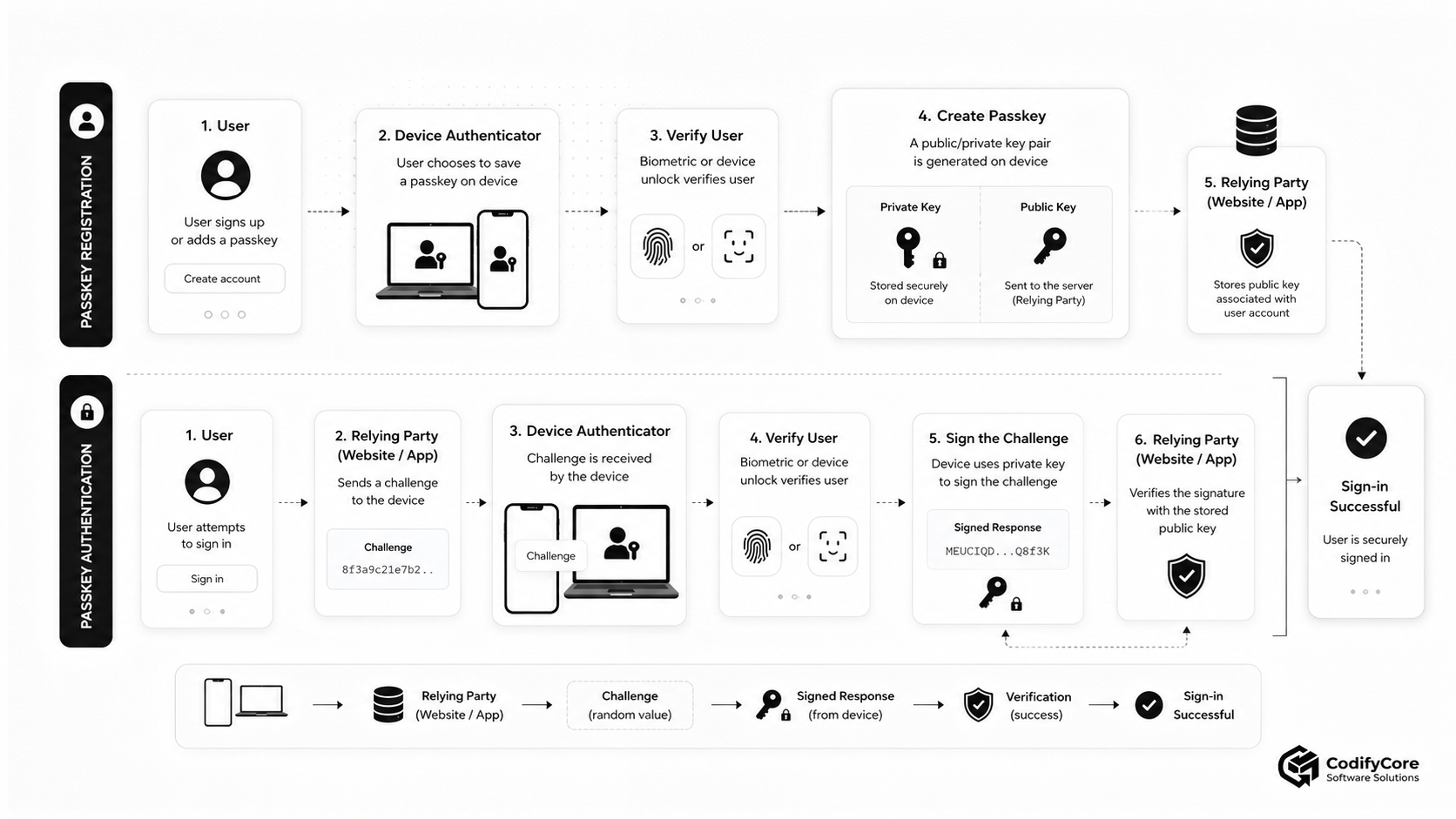
How passkey registration works
Passkey registration is often called the WebAuthn creation ceremony.
Step 1: The user is securely identified
For an existing account, the application should first establish that the user is authorised to add an authenticator.
This may happen through:
- Existing authentication
- A verified sign-up flow
- A recovery flow with appropriate assurance
- An authenticated enterprise-enrollment process
Step 2: The server creates registration options
The relying party generates information including:
- A fresh random challenge
- Relying-party identity
- User identifier
- User display information
- Accepted algorithms
- Authenticator preferences
- User-verification requirements
- Attestation preference
- Existing credential IDs to exclude where appropriate
Step 3: The client asks the authenticator to create a credential
On the web, this is performed through the Web Authentication API.
The browser or operating system displays the appropriate native credential interface.
Step 4: The user approves creation
The user confirms with:
- Fingerprint
- Face
- Device PIN
- Pattern
- Security-key interaction
Step 5: A key pair is generated
The authenticator creates a credential scoped to the relying party.
The private key remains with the authenticator or passkey provider.
Step 6: The server validates the registration response
The server should verify:
- Challenge
- Origin
- Relying-party ID hash
- Credential type
- User-verification flags
- Public-key algorithm
- Attestation where required
- Credential uniqueness
Step 7: The public credential is stored
A server-side credential record may include:
{
  "credential_id": "base64url-value",
  "user_id": "USER-1942",
  "public_key": "credential-public-key",
  "created_at": "2026-06-26T10:00:00Z",
  "last_used_at": null,
  "display_name": "Personal phone",
  "transports": ["internal", "hybrid"],
  "backup_eligible": true,
  "revoked_at": null
}
The exact stored fields depend on the WebAuthn library, product requirements and supported specification features.
How passkey authentication works
Authentication is the WebAuthn assertion ceremony.
Step 1: The user starts sign-in
The application may:
- Ask for an email or username
- Offer a passkey in the account field
- Show an account-selection interface
- Trigger passkey sign-in from a dedicated button
Step 2: The server creates a challenge
The challenge must be:
- Cryptographically random
- Short-lived
- Associated with the intended authentication attempt
- Used only once
Step 3: The authenticator locates the credential
The credential may be:
- On the current device
- Synced through a credential provider
- On a security key
- Available from a nearby phone through cross-device authentication
Step 4: The user verifies locally
The device asks for its configured unlock method.
Step 5: The authenticator signs the challenge
The private key signs a response that includes information bound to the relying party and the authentication ceremony.
Step 6: The server validates the response
The server verifies:
- Challenge
- Origin
- Relying-party ID
- Credential ID
- Signature
- User-presence flag
- User-verification flag where required
- Credential status
- Any applicable risk or policy requirements
Step 7: The application creates a session
WebAuthn authenticates control of the credential.
The application must still create and protect its own authenticated session.
Why passkeys are resistant to phishing
Traditional authentication frequently depends on something the user can type or relay:
- Password
- SMS code
- Email code
- Authenticator-app OTP
- Recovery code
A phishing site can ask the user to provide one of these values and then reuse or relay it.
WebAuthn takes a different approach.
The authenticator creates an output bound to the legitimate verifier identity. NIST identifies WebAuthn as an example of phishing resistance through verifier-name binding. [6]
If a user reaches a lookalike domain, the credential registered for the legitimate domain is not available to that attacker-controlled relying party.
This protection does not depend on the user visually noticing a subtle spelling difference in the URL.
Passkeys also resist credential stuffing
A leaked password can be tried on many websites because users frequently reuse passwords.
A passkey credential is specific to a relying party.
A public key stolen from one service cannot be used as an authentication secret at another service.
A server breach exposes less reusable authentication material
A password server normally stores password verifiers or hashes that attackers may attempt to crack.
A passkey server stores public keys.
Those public keys are designed to verify signatures, not to generate them. [5]
The server still requires strong protection because an attacker could:
- Modify credential records
- Add an unauthorised passkey
- Steal active sessions
- Change recovery information
- Manipulate account state
Passkeys reduce one major class of credential theft; they do not make the identity platform unimportant.
Password sign-in versus passkey sign-in
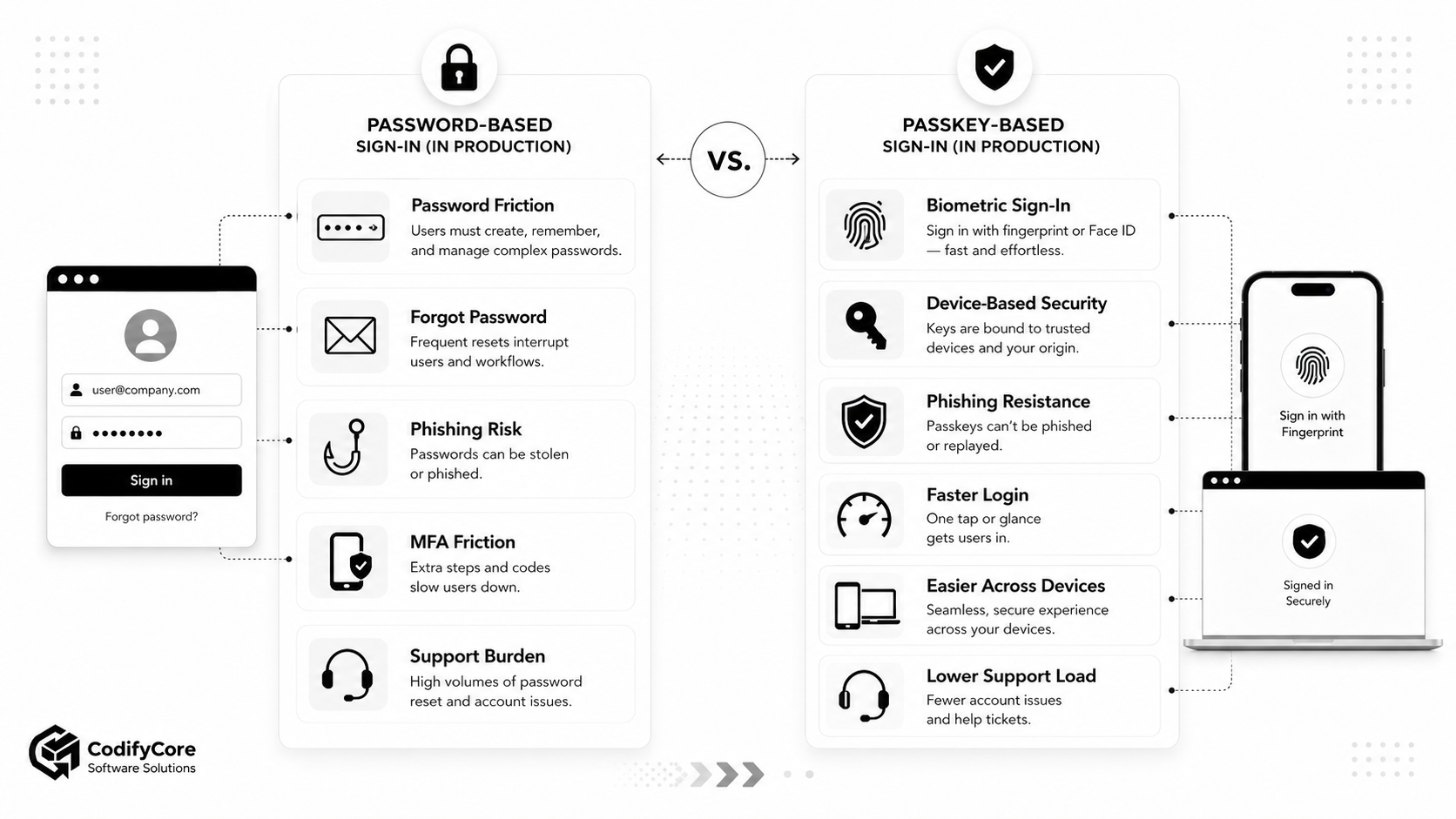
| Area | Password-based sign-in | Passkey-based sign-in |
|---|---|---|
| User input | Username, password and possibly OTP | Account selection plus device unlock |
| Server secret | Password verifier or hash | Public key |
| Phishing exposure | High | Strongly resistant |
| Credential reuse | Common | Credential is relying-party-specific |
| Forgotten credential | Frequent | No memorised site password |
| Device integration | Optional | Central to the experience |
| Cross-device use | Password can be typed anywhere | Sync, nearby-device or security-key flow |
| Recovery | Password reset | Provider sync, additional passkey or RP recovery |
| Support burden | Password and MFA resets | Device, credential and recovery assistance |
| High-assurance option | Password plus stronger factor | Device-bound cryptographic authenticator |
| Main product risk | Theft and friction | Confusing rollout or weak fallback |
What passkeys solve—and what they do not
Passkeys can reduce
- Password phishing
- Credential stuffing
- Password reuse
- Forgotten-password resets
- SMS OTP dependency
- Shared-secret exposure
- Login completion time
- Authentication-support load
Real deployments have reported materially higher sign-in success and faster authentication, although outcomes vary by user population, platform and implementation. Google’s published case-study collection includes examples ranging from higher conversion to substantially faster sign-in. [7]
Passkeys do not solve
- Session-cookie theft
- Malware controlling an unlocked device
- Broken account authorisation
- Fraud after successful authentication
- Social engineering of support teams
- Weak account recovery
- Compromised email accounts used as fallback
- Application-level access-control defects
- Insecure passkey enrollment
- Cross-site scripting
- Malicious browser extensions
- Insider misuse
Authentication establishes who is controlling an accepted credential.
The application must still determine what that user is allowed to do.
Synced passkeys versus device-bound passkeys
Not every passkey has the same lifecycle or assurance properties.
Synced passkeys
A synced passkey is stored and synchronised through a credential provider.
Examples may include platform credential managers or third-party password managers.
Benefits include:
- Availability across several devices
- Easier device replacement
- Lower risk of permanent credential loss
- Less repeated enrollment
- Familiar consumer experience
The user may create a passkey on a phone and later use it on another device connected to the same credential-provider account. [1]
Device-bound passkeys
A device-bound passkey remains bound to one authenticator.
Examples include:
- Hardware security key
- Enterprise-managed hardware authenticator
- Non-exportable platform credential where supported
Benefits can include:
- Stronger control over key location
- Reduced dependency on cloud synchronisation
- Suitability for high-assurance policies
- Stronger evidence about authenticator type when attestation is used
Trade-offs include:
- Device-loss risk
- Need for spare authenticators
- More enrollment steps
- Higher support and logistics requirements
Many organisations need both
Consumer accounts may prioritise synced passkeys.
Privileged administrators or regulated operations may require:
- Device-bound authenticators
- Approved hardware
- Attestation
- Managed device state
- Multiple registered security keys
FIDO’s enterprise guidance explicitly recognises that organisations may need a combination of synced and device-bound passkeys for different assurance levels and use cases. [3]
Are passkeys multi-factor authentication?
A passkey can function as a multi-factor cryptographic authenticator when use of the private key requires a local activation factor such as a PIN or biometric comparison.
The two elements are conceptually:
- Something the user possesses: the authenticator or protected credential
- Something the user knows or is: device PIN or local biometric verification
The relying party normally receives a user-verification result rather than the activation factor itself.
Assurance depends on implementation
The presence of the word “passkey” does not determine the assurance level by itself.
Relevant factors include:
- Whether user verification is required
- Whether the credential is synced or non-exportable
- Authenticator implementation
- Attestation
- Device management
- Recovery controls
- Cryptographic validation requirements
- Applicable regulatory profile
Under NIST SP 800-63B-4, syncable authenticators can support AAL2 under stated controls, while AAL3 requires a phishing-resistant authenticator with a non-exportable private key. [4]
The real production problem: user transition
A password can be entered on almost any device.
A passkey depends on a credential being available through:
- The current device
- A synced credential provider
- A nearby device
- A hardware security key
This means passkeys should be introduced as a user-journey migration, not merely a backend authentication change.
The unsafe rollout model
Day 1:
Add a passkey button

Day 30:
Remove passwords

Day 31:
Discover users do not understand account recovery
The stronger rollout model
Optional enrollment
→ prominent passkey sign-in
→ improved device coverage
→ tested recovery
→ passwordless account creation
→ reduced password use
→ controlled password retirement
FIDO’s passkey-journey guidance recommends a staged adoption model because moving immediately to passkey-only access can create unnecessary friction or abandonment. [8]
When should users be asked to create a passkey?
Good moments include:
After a successful sign-in
The service already has confidence that the user controls the account.
The prompt can say:
Sign in faster next time. Create a passkey using this device.
After successful account creation
A passkey can be established as part of the account-creation journey.
The user should understand that the credential will become a primary sign-in method.
After a successful high-assurance verification
For example:
- Email plus existing MFA
- Enterprise-issued enrollment link
- Identity verification
- Existing phishing-resistant authenticator
From account-security settings
Users should always have a predictable place where they can add another passkey.
Avoid repeated interruption
Do not show the same creation prompt on every visit after the user declines.
Use:
- Frequency limits
- Dismissal memory
- Relevant education
- Contextual prompts
- A permanent settings entry point
Passkey adoption improves when creation is discoverable without becoming coercive.
How should passkeys appear on the sign-in page?
A production sign-in page should not force the user to understand WebAuthn terminology.
Good labels include:
- Sign in with a passkey
- Use your passkey
- Use fingerprint, face or device lock
- Use another device
- Use a security key
- Try another way
Avoid relying on labels such as:
- WebAuthn assertion
- Platform authenticator
- Discoverable credential
- FIDO resident key
These are useful engineering terms, not user instructions.
Use account selection and passkey autofill
Conditional or autofill-style passkey experiences allow available passkeys to appear alongside the account-name field.
This has several advantages:
- The user may not need to type a username.
- Passkeys can coexist with passwords during migration.
- The browser or operating system presents known accounts.
- The user remains in a familiar sign-in layout.
Google’s implementation guidance recommends combining passkeys with an existing form so users with saved passkeys can choose them while password users retain an alternative. [5]
Maintain an explicit entry point too
Autofill should not be the only way to discover passkeys.
Consider also providing:
Sign in with a passkey
This is useful when:
- Autofill does not appear
- The browser does not support the desired flow
- The user wants a passkey from another device
- The user expects a dedicated action
Identifier-first versus usernameless sign-in
Identifier-first
The user enters an email or username before authentication.
Benefits:
- Familiar
- Easier account routing
- Useful for organisations with multiple identity sources
- Simpler fallback handling
Trade-off:
- Adds an input step even when the credential could identify the account
Usernameless or discoverable-credential sign-in
The authenticator supplies account information associated with available credentials.
Benefits:
- Faster sign-in
- Less typing
- Better fit for true passwordless access
Trade-offs:
- Requires discoverable credentials
- Needs careful account-selection UX
- Shared-device behaviour must be considered
- The relying party must map the credential’s user handle correctly
Many production systems support both.
Cross-device authentication
A user may visit a website on a laptop while the required passkey is available on a phone.
The browser can offer a nearby-device flow, commonly initiated through a QR code and protected by proximity mechanisms.
A typical journey is:
- The laptop displays a QR code.
- The user scans it with the phone.
- The devices establish a protected nearby connection.
- The phone verifies the user.
- The phone authorises the sign-in on the laptop.
This is valuable when:
- The credential is not synced to the current device
- The user is moving between ecosystems
- The laptop is borrowed or temporary
- The phone is the user’s trusted sign-in device
Do not describe QR scanning as ordinary authentication
The QR code initiates the cross-device protocol.
The phone still verifies the user and performs the cryptographic operation.
Make the instructions explicit
Weak:
Scan this code.
Stronger:
Scan this code with the phone that contains your passkey. Keep Bluetooth enabled and follow the instructions on your phone.
Native app and website integration
A user should ideally experience one account identity across the application’s website and native app.
This requires correctly associating the app with the web domain used as the relying party.
On Android
Credential Manager provides the primary passkey integration surface.
App-to-website credential sharing requires valid Digital Asset Links establishing the relationship between the Android application and the domain. [9]
On Apple platforms
Apps use Authentication Services and associated-domain configuration to connect the application to the relying-party domain. Apple supports passkeys across its devices and credential-provider ecosystem. [10]
Common integration failures
- Incorrect domain-association file
- Wrong application package or team identifier
- Mismatched relying-party ID
- Redirect to a different authentication domain
- Using an embedded webview where the native passkey API is required
- Staging and production environments sharing the wrong configuration
- Association files blocked by authentication or redirects
Test the final production hostnames, package identities and certificate configuration.
Relying-party ID and domain strategy
The relying-party ID determines where the credential is valid.
This should be decided before large-scale enrollment.
Questions to answer
- Will sign-in occur at
example.comoraccounts.example.com? - Must credentials work across several subdomains?
- Are there multiple brands or country domains?
- Does authentication use a third-party hosted domain?
- Will the product migrate domains later?
- Do native apps need the same credential?
Domain migration is not trivial
A credential scoped to one unrelated relying-party domain cannot simply be used on another.
A rebrand or identity-domain migration may require:
- Continued operation of the old domain
- Authenticated migration flows
- New passkey creation
- User communication
- Extended transition periods
Treat relying-party identity as long-lived authentication infrastructure.
Design account recovery before password removal
Passkeys reduce forgotten-password problems.
They do not remove the possibility of account loss.
Users may lose access because:
- A device was lost
- A credential-provider account is inaccessible
- The user changed ecosystems
- A hardware security key was lost
- An employee left a managed device behind
- All registered passkeys were removed
- A provider stopped synchronising
- An account was compromised and credentials were changed
Synced passkeys improve recovery, but do not replace RP recovery
When a user sets up a new device and signs in to the same credential-provider account, synced passkeys may become available again.
However, the relying party still needs a recovery strategy for cases where that route is unavailable.
Encourage multiple access methods
NIST recommends encouraging users to maintain at least two separate means of authentication to reduce the need for formal recovery. [11]
This may include:
- Passkey on another device
- Hardware security key
- A second credential provider
- Enterprise-issued authenticator
- Carefully controlled recovery method
Weak recovery can undermine passkey security
If an attacker can bypass passkeys using:
- An easily hijacked email address
- SMS alone
- Knowledge-based questions
- A socially engineered support call
then the account may remain vulnerable despite phishing-resistant daily authentication.
FIDO guidance emphasises that recovery is part of the security model and should not be treated as an unrelated support process. [12]
A practical recovery hierarchy
1. Another registered passkey
This is usually the cleanest recovery path.
2. Credential-provider restoration
The user restores synced passkeys through the provider’s secured account-recovery process.
3. Device-bound backup authenticator
A second hardware key or managed authenticator can restore access.
4. Existing authenticated session
A trusted, recently authenticated session may allow the user to create a replacement credential, subject to risk checks and reauthentication.
5. Recovery code
Recovery codes can provide emergency access but should be treated as sensitive secrets.
They do not offer the same phishing resistance as passkeys. [8]
6. Verified support or identity-recovery process
High-value accounts may require:
- Identity-document verification
- In-person support
- Enterprise manager approval
- Multi-party help-desk procedure
- Delayed recovery with security notifications
7. Email or SMS fallback
These may be necessary for broad consumer accessibility, but they create a lower-assurance recovery path.
Use additional risk controls and avoid presenting them as equivalent to passkey authentication.
Protect passkey enrollment as a sensitive event
An attacker who controls an active session may try to add their own passkey and create persistent account access.
Before adding a credential, consider requiring:
- Recent authentication
- Existing passkey reauthentication
- Appropriate MFA
- Risk evaluation
- User-verification requirement
- Notification to existing contact channels
Record:
- Time
- Session
- Device information where available
- Credential metadata
- User and administrator responsible
- Security outcome
Notify the user
Send a message such as:
A new passkey was added to your account. If this was not you, review your account security immediately.
The notification should not include sensitive credential data.
Protect passkey deletion
Removing an authenticator may be part of an account-takeover attempt.
Require:
- Authenticated session
- Reauthentication for sensitive accounts
- CSRF protection
- Authorisation
- Confirmation
- Audit logging
- User notification
Do not allow a user to delete their final recovery-capable authenticator without clearly explaining the consequence or establishing an alternative.
Build a useful passkey-management screen
Users need to understand what account-access methods exist.
A management page should allow them to:
- View registered passkeys
- Add a passkey
- Add a security key
- Remove a passkey
- See approximate creation date
- See last-used date where recorded
- Assign a recognisable label
- Review recovery methods
- Report a lost device
- End suspicious sessions
FIDO’s UX guidance recommends presenting credentials in user-friendly groups such as passkeys on devices and passkeys on security keys rather than exposing internal technical terminology. [13]
Be careful with device names
The relying party may not know the exact physical device or credential provider.
Avoid confidently labelling a credential “John’s iPhone” unless that description was provided by the user or reliably supplied through an approved mechanism.
A safer approach is:
Personal phone
Created 12 June 2026
Last used today
A production passkey architecture
A real deployment requires more than WebAuthn endpoints.
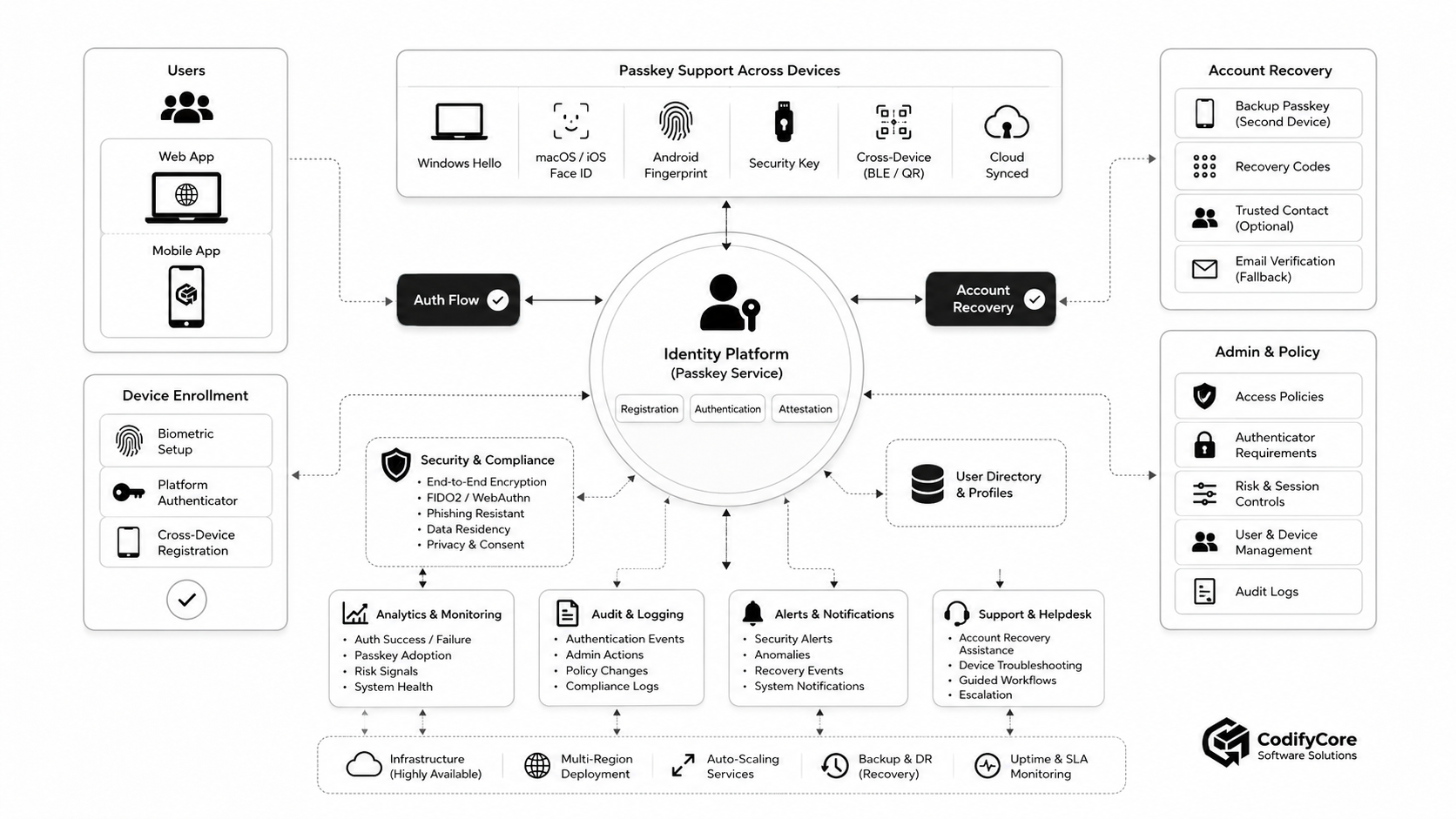
1. Client applications
- Website
- Mobile application
- Desktop application
- Administrative portal
- Partner portal
2. WebAuthn or platform client layer
Responsible for:
- Credential creation
- Credential request
- Conditional mediation
- Cross-device flows
- Cancellation handling
- Native user interface
- Client capability detection
3. Identity platform
Responsible for:
- User accounts
- Registration options
- Authentication options
- Response verification
- Credential records
- Authentication policy
- Session issuance
- Risk controls
4. Credential-management service
Responsible for:
- Add
- List
- Label
- Revoke
- Audit
- Detect duplicates
- Apply account and tenant policy
5. Recovery service
Responsible for:
- Alternative authenticators
- Recovery codes
- Verified help-desk workflows
- Identity verification
- Delays and notifications
- Account restoration
6. Policy engine
Responsible for determining:
- Whether user verification is required
- Whether synced credentials are allowed
- Whether device-bound credentials are required
- Whether attestation is necessary
- Which actions require step-up authentication
- Whether credential enrollment is permitted
7. Session and risk service
Passkeys authenticate the user at session creation or step-up.
The application still needs:
- Secure cookies
- Session expiry
- Device and risk signals
- Reauthentication
- Session revocation
- Suspicious-activity detection
8. Audit and monitoring
Record:
- Registration attempt
- Registration success or failure
- Authentication attempt
- Authenticator type or relevant flags
- Fallback use
- Recovery
- Credential removal
- Administrative action
- Risk decision
9. Support and administration
Support staff need safe tools to:
- Confirm account state
- View non-sensitive credential metadata
- Understand error categories
- Begin controlled recovery
- Revoke credentials
- Escalate suspicious events
Support staff should never ask users to reveal device PINs, biometrics or private keys.
WebAuthn server implementation requirements
Avoid implementing WebAuthn cryptographic parsing from scratch.
Use a mature, maintained server library that correctly handles:
- Binary formats
- Base64url encoding
- CBOR
- COSE keys
- Challenge validation
- Origin validation
- Relying-party ID validation
- Signature verification
- Attestation formats
- Extension data
- User-verification flags
Challenge storage
Challenges should be:
- Random
- Single-use
- Time-limited
- Bound to the correct ceremony
- Bound to the intended user or flow where applicable
- Invalidated after success
Do not trust a challenge returned by the browser without comparing it to server-side state.
Origin validation
Use an explicit allowlist.
Do not accept any origin that merely ends with a familiar string.
User handles
WebAuthn user handles should be:
- Stable
- Opaque
- Non-personally identifying where practical
- Unique to the relying party
Avoid using an email address directly as the user handle when an internal random identifier is available.
Credential uniqueness
Prevent the same credential from being registered repeatedly to the same account where applicable.
Use the credential-exclusion list during creation.
User verification
Set and verify the appropriate user-verification policy.
For higher-risk access, required is generally more appropriate than assuming the device will perform verification automatically.
Should you require attestation?
Attestation can provide information about the authenticator that created the credential.
It may be useful when an enterprise must enforce:
- Approved hardware
- Device-bound credentials
- Authenticator certification
- Hardware-backed key storage
- Regulatory requirements
- Managed security keys
Consumer applications often do not need attestation
Requesting detailed attestation can:
- Increase complexity
- Reduce privacy
- Limit compatible authenticators
- Create metadata-management obligations
- Add support challenges
Use attestation because an explicit policy requires it—not because it sounds more secure.
Passkeys and step-up authentication
A user may sign in with a synced passkey for ordinary account access but require a stronger authenticator for:
- Changing payment details
- Exporting sensitive records
- Administrative access
- Production deployment
- Large financial transaction
- Enrolling another privileged authenticator
A policy might require:
Standard access:
Synced passkey with user verification

Privileged access:
Approved device-bound passkey with attestation
This provides strong usability without treating every transaction as having the same risk.
Session security still matters
A phishing-resistant sign-in does not protect an already-issued session if the session token is stolen.
Apply:
- Secure, HttpOnly cookies
- SameSite policy
- CSRF protection
- Shorter sessions for privileged access
- Reauthentication for sensitive operations
- Session revocation
- Device and anomaly monitoring
- Protection against cross-site scripting
- Token binding or device-bound session controls where available and appropriate
Do not advertise an application as phishing-proof merely because its login page supports passkeys.
Error handling without confusing users
WebAuthn errors can occur because:
- The user cancelled
- No eligible credential is available
- The authenticator timed out
- The relying-party configuration is incorrect
- The origin is not authorised
- The device lacks required capabilities
- A credential already exists
- User verification failed
- Cross-device connection failed
- The server rejected the response
Do not expose raw browser errors
Weak:
DOMException: NotAllowedError
Better:
We couldn’t complete passkey sign-in. Try again, use a passkey from another device, or choose another sign-in method.
Treat cancellation normally
Users may cancel because:
- They selected the wrong account
- They do not understand the prompt
- They intended to use another device
- The system dialog appeared unexpectedly
Cancellation is not necessarily an application failure or security incident.
Preserve the user’s context
After a failed passkey attempt:
- Keep the entered account identifier where appropriate.
- Show another available method.
- Explain the next step.
- Avoid restarting the complete sign-in journey.
Accessibility and inclusion
Passkeys should not require users to use biometrics.
Authenticators commonly support alternatives such as device PINs or patterns.
Consider users who:
- Cannot use fingerprint sensors
- Do not use facial recognition
- Share devices
- Use assistive technology
- Have limited connectivity
- Use older hardware
- Work in restricted enterprise environments
- Cannot use a personal phone at work
- Need delegated or assisted access
NIST’s customer-experience guidance emphasises clear alternatives and technical assistance rather than forcing biometric interaction. [14]
Shared and public devices
A passkey stored on a shared device may be inappropriate in some contexts.
Consider:
- Family tablets
- Call-centre workstations
- School computers
- Retail kiosks
- Healthcare stations
- Temporary contractor devices
The user interface should avoid encouraging permanent credential creation when:
- The device is shared
- The user is in private browsing
- The session appears temporary
- The device is unmanaged
- Local policy prohibits storage
Cross-device sign-in with the user’s phone or a security key may be more appropriate.
Build versus buy
Build around a library when:
- The organisation already operates an identity platform.
- It has experienced authentication engineers.
- Custom policies and data models are important.
- It can maintain platform compatibility.
- It has security-testing and incident-response capability.
Use an identity provider or authentication platform when:
- Speed of implementation matters.
- The team lacks WebAuthn expertise.
- Multi-platform SDKs are needed.
- Recovery, risk and administrative tools are required.
- Compliance support is important.
- Authentication is not a product differentiator.
Evaluate providers on more than “supports passkeys”
Ask whether they support:
- Synced passkeys
- Device-bound passkeys
- Security keys
- Conditional UI
- Native mobile apps
- Cross-device authentication
- Multiple credentials per account
- Attestation policy
- Credential metadata
- Recovery
- Tenant isolation
- Audit logs
- Export and migration
- Password-retirement controls
- Regional data requirements
A phased production rollout
Phase 1: Technical readiness
- Select WebAuthn libraries or provider.
- Define relying-party IDs.
- Configure website and app association.
- Build registration and authentication.
- Add credential management.
- Add telemetry and audit.
- Threat-model enrollment and recovery.
Phase 2: Internal and low-risk pilot
Start with:
- Employees
- Test accounts
- Opt-in customers
- One browser and device segment
- Non-critical applications
Measure errors and support questions.
Phase 3: Optional enrollment for existing users
After successful sign-in:
Create a passkey for faster and safer sign-in.
Keep the password and existing MFA available.
Phase 4: Passkey-first sign-in
Use:
- Account selection
- Autofill
- Prominent passkey button
- Password under “Try another way”
The password still exists, but it is no longer the default.
Phase 5: Passwordless account creation
New users create an account with:
- Verified account information
- Passkey
- Recovery preparation
Do not create a hidden password merely to satisfy an old backend dependency.
Phase 6: Reduce weaker fallback
For users with sufficient passkey coverage:
- Remove SMS from normal sign-in
- Restrict password use
- Require passkey for sensitive actions
- Encourage another registered authenticator
Phase 7: Controlled password retirement
Remove the password only when:
- Passkey enrollment is reliable
- Major devices are supported
- Recovery is proven
- Support is prepared
- High-risk edge cases have been tested
- Users receive clear notice
- Regulatory and accessibility requirements are satisfied
Testing matrix
Test beyond the development team’s preferred browser.
Platforms
- Windows
- macOS
- iOS
- Android
- Linux where relevant
- Managed enterprise devices
Browsers
- Chrome
- Safari
- Edge
- Firefox
- Supported embedded or application browser environments
Credential locations
- Platform authenticator
- Synced passkey provider
- Third-party credential provider
- Hardware security key
- Nearby phone
User journeys
- New account
- Existing account
- Add second passkey
- Sign in on same device
- Sign in on new device
- Cross-device authentication
- Remove credential
- Lost device
- Credential-provider recovery
- Support-assisted recovery
- Shared device
- Private browsing
- User cancellation
Failure cases
- Expired challenge
- Reused challenge
- Wrong origin
- Wrong relying-party ID
- Invalid signature
- Duplicate registration
- User-verification failure
- Association-file failure
- Network interruption
- Server timeout
- Account disabled
- Credential removed during sign-in
Metrics that matter
Enrollment
- Users offered passkey creation
- Prompt acceptance
- Creation success
- Cancellation
- Error rate
- Time to create
- Passkeys per account
Authentication
- Passkey sign-in share
- Authentication success
- Time to sign in
- Fallback use
- Cross-device use
- Authentication failure by platform
- Repeated attempts
Recovery
- Recovery initiation
- Recovery completion
- Method used
- Time to recover
- Support involvement
- Suspected takeover
- Users who regain access through another passkey
Business
- Conversion
- Abandonment
- Help-desk contacts
- SMS cost
- Account-takeover incidents
- Password resets
- Customer satisfaction
- Employee productivity
Published deployments demonstrate why measurement matters. Microsoft reported substantially higher success and faster authentication for passkey users, while other case studies from Mercari, Dashlane, KAYAK, pixiv and additional services show that results depend on the specific product journey and user population. [7][15]
Common passkey implementation mistakes
1. Treating passkeys as a security-key-only feature
Synced passkeys and hardware security keys support different use cases.
Do not design every consumer journey as if the user carries a USB token.
2. Removing passwords before solving recovery
This converts a forgotten-password problem into a locked-account problem.
3. Hiding the passkey option
A technically functional passkey that users never discover produces little value.
4. Prompting too aggressively
Repeated creation prompts make the feature feel like an obstacle.
5. Using technical terminology in the interface
Users should not need to understand authenticators, resident keys or CTAP.
6. Assuming biometrics are mandatory
Device PIN or another local unlock method may be used.
7. Treating all passkeys as equivalent
Synced and device-bound credentials have different lifecycle and assurance properties.
8. Forgetting native-app domain association
The application may work on the website while failing in the native app.
9. Trusting the client response without complete validation
The server must independently verify the challenge, origin, relying-party ID, signature and required flags.
10. Relying only on sign-in testing
Registration, management, revocation, recovery and support are equally important.
11. Keeping password fallback forever without a strategy
If every user always sees and uses a password first, passkey adoption may remain low.
12. Claiming passkeys solve account security completely
Sessions, recovery, enrolment, authorisation and fraud remain separate security layers.
A production implementation checklist
Product and UX
- Clear passkey terminology
- Discoverable creation
- Autofill or account selection
- Explicit sign-in button
- Cross-device instructions
- Alternative sign-in method
- Passkey-management screen
- Recovery guidance
- Accessible experience
- Shared-device handling
Server security
- Strong challenge generation
- One-time challenge validation
- Strict origin allowlist
- Correct relying-party ID
- Signature verification
- User-verification enforcement
- Secure credential storage
- Enrollment reauthentication
- Credential revocation
- Rate limiting
- Audit logging
Platform integration
- WebAuthn browser implementation
- Android Credential Manager
- Apple Authentication Services
- Domain association
- App association
- Security-key testing
- Credential-provider testing
- Feature detection
Operations
- Authentication metrics
- Recovery metrics
- Support runbooks
- Security notifications
- Incident response
- Credential-removal process
- High-assurance policy
- Vendor review
- Rollback plan
- Password-retirement plan
When should passwords finally be removed?
Remove passwords for a user or user group when the application can demonstrate that:
- Passkeys work across their expected devices.
- More than one recovery-capable path is available.
- New-device access has been tested.
- Support can diagnose failures.
- Enrollment and recovery are protected.
- Passkey sign-in is more successful than the old flow.
- Users understand the change.
- Required accessibility alternatives exist.
- Higher-assurance accounts use appropriate authenticators.
- Removing the password does not leave an equally weak fallback.
The objective is not to remove the password field as quickly as possible.
The objective is to remove dependency on shared secrets while improving—not damaging—account access.
The future of passkey authentication
Passkeys are becoming a common authentication layer across browsers, operating systems, native applications, credential managers and enterprise identity platforms.
WebAuthn Level 3 is advancing additional capabilities around credential management and user experience, but it remained a Candidate Recommendation Snapshot as of May 2026 rather than a completed W3C Recommendation. Production teams should use feature detection and test the actual browser and platform support they depend on. [2]
The longer-term direction is toward:
- Passkey-first account creation
- Account selection without usernames
- Better credential-provider choice
- Easier management and revocation
- More reliable app-and-web credential sharing
- Improved recovery
- Stronger enterprise policy
- Reduced password and OTP dependency
Passwords are unlikely to disappear from every system at once.
For years, many applications will operate in a mixed environment containing:
- Password users
- Passkey users
- Federated identities
- Security keys
- Legacy MFA
- Recovery mechanisms
The strongest implementations will manage this transition deliberately rather than pretending it has already ended.
Conclusion
Passkeys can replace one of the weakest and most frustrating parts of modern software.
They remove the need for users to remember and transmit reusable website passwords.
They reduce phishing and credential-stuffing exposure.
They can make authentication faster and more successful.
But the WebAuthn ceremony is only the technical core of a production implementation.
A trustworthy passkey product must also provide:
- Clear enrollment
- Discoverable sign-in
- Cross-device use
- Native-app integration
- Credential management
- Multiple access methods
- Secure recovery
- High-assurance options
- Session protection
- Monitoring
- Support
- Gradual password retirement
The most important question is not:
Can our application create and verify a passkey?
It is:
Can every intended user create, find, use, replace and recover their passkeys without falling back to an experience that is more confusing—or less secure—than the password system we are replacing?
When the answer is yes, passkeys become more than a security feature.
They become a better authentication product.
Frequently Asked Questions
What is a passkey?
A passkey is a FIDO public-key credential used to sign in to a particular website or application without entering a password.
How does a passkey work?
The user’s authenticator signs a server-generated challenge with a private key, and the service verifies the signature using the stored public key.
Is a passkey the same as a fingerprint?
No. A fingerprint may unlock the credential locally, but it is not the passkey and is not normally sent to the application.
Are passkeys phishing-resistant?
Yes. WebAuthn credentials are bound to the legitimate relying-party domain and cannot be used by an unrelated phishing domain.
Does the server store the passkey’s private key?
No. The server stores the public key and credential metadata. The private key remains with the authenticator or credential provider.
Can passkeys be hacked?
No authentication method eliminates every risk. Passkeys greatly reduce password phishing and credential theft, but applications must still secure sessions, enrollment, recovery and account authorisation.
What is a synced passkey?
A synced passkey is made available across a user’s devices through a secured credential-provider account.
What is a device-bound passkey?
A device-bound passkey remains on one authenticator, such as a hardware security key, and is not synchronised to other devices.
Are synced passkeys less secure?
They provide strong phishing resistance, but key synchronisation changes the lifecycle and assurance model. High-assurance environments may require non-exportable device-bound credentials.
Can passkeys replace MFA?
A user-verified passkey can provide multifactor cryptographic authentication because possession of the authenticator is combined with a local PIN or biometric activation factor.
Do passkeys work across devices?
Yes. They may be synchronised through a credential provider or used from a nearby phone or portable security key.
What happens when a user loses a phone?
The user may regain synced passkeys through the credential provider, use another registered passkey or complete the relying party’s recovery process.
Should an account have more than one passkey?
Yes. Additional credentials reduce dependence on one device or recovery method.
Can passkeys and passwords coexist?
Yes. A phased rollout commonly offers both while passkey adoption, recovery and device support mature.
What is passkey autofill?
Passkey autofill allows available passkeys to appear in the account or username field so users can select one without following a separate authentication journey.
Do passkeys work in mobile apps?
Yes. Native applications use platform credential APIs and must establish the correct association with the relying-party domain.
What is a relying-party ID?
The relying-party ID identifies the website or service for which the credential is valid and is normally based on its domain.
Should passkey enrollment require reauthentication?
For existing or sensitive accounts, yes. Adding a passkey creates a new route into the account and should be treated as a high-risk event.
Should a service request attestation?
Only when it has a policy or assurance requirement to identify or restrict authenticator types. Many consumer services do not need detailed attestation.
How should a company begin deploying passkeys?
Start with standards-based implementation, optional enrollment for authenticated users, passkey-first sign-in, credential management, strong recovery and measured staged rollout.